What is internal and external linking in SEO: A semantic architecture approach
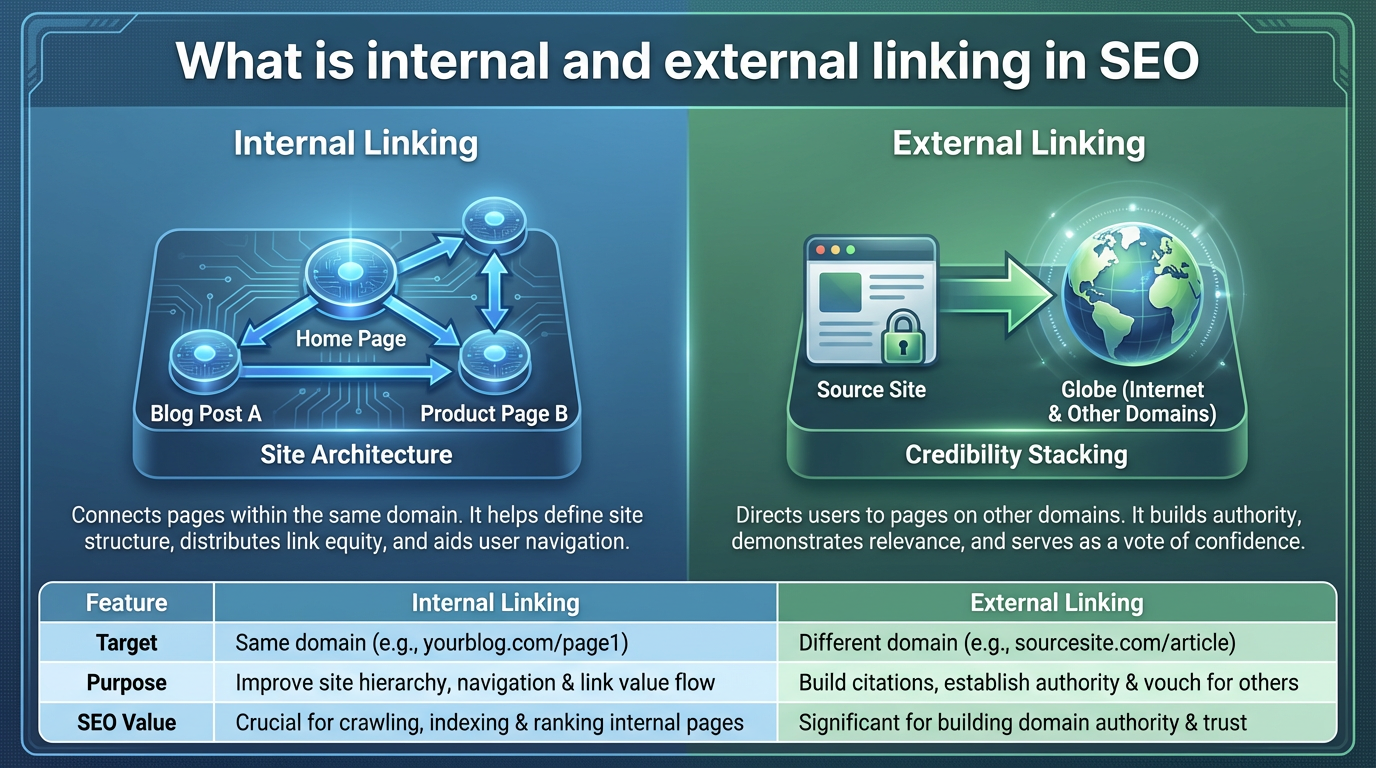
Internal and external linking in SEO refers to the practice of connecting web pages through hyperlinks: internal links point to other pages within the same domain and help search engines map your site's topical structure, while external links point to authoritative third-party domains and signal credibility through the sources you choose to cite.
The traditional view treats links primarily as vote counters for authority distribution. That framing is incomplete. Search engines still use links to pass ranking equity between pages, but they also use link context alongside semantic signals to understand what a page is about and how it relates to surrounding content. Most link management tools are built around static keyword lists, which fail to capture contextual relevance. That gap is what this guide addresses.
This guide breaks down how internal and external linking work as a systems problem, not a checklist problem. You'll learn what separates effective linking from link stuffing, how crawl budget constrains large sites, and why vector-based relevance outperforms manual anchor text management.
What are internal and external links in SEO?
Internal links are hyperlinks that direct users and search engines from one page on your domain to another page on the same domain. External links (also called outbound links when you create them) direct traffic to pages on other domains. Both serve different SEO functions, though they work together to define your site's topical authority and credibility.
Internal links tell Google which pages matter on your site. If your homepage links to five product pages but not a sixth, that sixth page competes for attention without an authority signal behind it. External links tell Google you've researched the topic by citing authoritative sources. A page that links to the official spec for HTTP/2 signals deeper expertise than one that mentions it vaguely.
From a site architecture perspective, internal links create a graph. If every blog post links back to your pillar page on a given topic, that pillar accumulates more crawl frequency and ranking signals than supporting pages. The relationship is mechanical, not magical: pages that receive more internal links from well-linked pages tend to rank better, because crawlers visit them more often and equity flows toward them.
| Attribute | Internal links | External links |
|---|---|---|
| Domain | Same domain (example.com to example.com) | Different domain (example.com to trusted-source.com) |
| Authority flow | Redistributes existing domain authority; does not increase total authority | Brings authority into your domain from external sources |
| Topical signal | Maps semantic relationships and content hierarchy | Validates expertise through third-party credibility |
| Crawl impact | Guides crawlers to discover and prioritize pages | Can waste crawl budget if linking to irrelevant external sites |
| User experience | Keeps visitors on your site longer | Sends visitors away; use sparingly or in new windows |
| Control | You fully control placement and anchor text | You suggest links; external sites decide to accept or reject |
| Link equity | Passes PageRank internally; more links per page dilutes equity per target | Greater impact per link; fewer external links maintain equity |
Internal linking strategy should emphasize semantic relevance and site architecture. External linking strategy should emphasize credibility and third-party validation. Mixing the two up is where most sites go wrong. You don't need 50 internal links on every page, and you shouldn't link externally just because a topic came up.
Internal vs external linking: Authority distribution rules
PageRank as a publicly visible score is gone, but the underlying concept remains central to how internal linking works. When you add an internal link from Page A to Page B, you do not increase your site's total authority. You redistribute it. If Page A has earned high rankings through external backlinks, links within Page A can transfer some of that ranking power to Page B.
However, each additional link on Page A dilutes the equity flowing to any single target. Adding more internal links to an already link-heavy page gives each target a smaller share of that page's authority. The implication is practical: you cannot optimize every page simultaneously by piling on internal links. You have to choose which pages most need authority flow and direct it there deliberately.
Pages competing for high-intent, competitive keywords benefit most from receiving internal links from your highest-ranked pages. Pages already ranking well organically need less reinforcement. That's the actual decision you're making when you add or remove an internal link.
External links work differently. When you link to an external source, you're making a credibility judgment. If that source is low-quality, it signals poor editorial standards. If it's authoritative, it signals you've done the research. Linking to official documentation, government data, or primary research strengthens your topical authority more reliably than linking to generic blog posts that summarize the same material.
Vector-based relevance changes the calculation for internal links specifically. Search engines evaluate not just whether a link exists, but whether the anchor text, source page, and target page are semantically cohesive. A page about database indexing that links to another page using the anchor text "SQL optimization" creates weak semantic coherence, even if both pages mention databases. A link with anchor text "B-tree index implementation" creates stronger coherence because the anchor, source, and target all address the same specific concept.
This is why manual keyword matching produces mediocre results. You match on surface-level word overlap, not conceptual alignment. Semantic analysis calculates cosine similarity between the source context, anchor, and target page using vector embeddings, surfacing relevant pages that share no obvious keywords but address the same underlying problem.
For internal authority distribution: semantic relevance per link matters more than link quantity. Three precisely relevant internal links will outperform ten loosely matched ones, because the equity flows to pages that are genuinely related, and crawlers treat those links as meaningful signals rather than noise.
What are the common types of hyperlinks in SEO?
Not all links serve the same function. Understanding the main link types helps you structure sites for both readers and crawlers.
Navigational links
Navigational links appear in menus, headers, footers, and sidebars. They help users orient within site structure. A basic example:
<nav class="header-nav">
  <a href="/">Home</a>
  <a href="/blog">Blog</a>
  <a href="/products">Products</a>
</nav>
Navigational links are critical for crawlability but pass limited ranking authority because they appear on every page. If an important page is only reachable through a sidebar menu that loads via JavaScript, crawlers may never find it. Test navigation discoverability using the URL Inspection tool in Google Search Console.
Contextual links
Contextual links appear within the body of content and point to relevant pages or sources. These carry the most SEO weight because they appear in unique locations, use anchor text relevant to the target, and get clicked by readers who find them useful.
<p>To understand how search engines prioritize crawling requests,
read about <a href="/guides/crawl-budget">site crawl budget</a>
and its impact on large ecommerce catalogs.</p>
Contextual links are where semantic relevance creates ranking impact. A contextual link with cohesive anchor text, source context, and target page passes more authority than a navigational link twice as prominent on the page.
Citation links
Citation links appear in reference sections or at the bottom of articles, attributed explicitly to external sources.
<div class="references">
  <p><a href="https://developers.google.com/search/docs/fundamentals/seo-starter-guide">
  Google SEO Starter Guide</a></p>
</div>
Citation links signal research depth. They rarely get clicked, but they carry credibility weight because they're explicit attempts to validate claims with primary sources rather than assertions standing alone.
Semantic links
Semantic links are contextual links where both the anchor text and the target page are identified through vector similarity rather than keyword matching. The source and target are related in meaning, not just in shared vocabulary.
For example, a page about "NoSQL databases" might link to a page titled "Distributed data consistency patterns" using anchor text "eventual consistency trade-offs". A keyword-matching tool finds no shared words and suggests nothing. A semantic tool identifies both pages as addressing the same class of problem and surfaces the connection.
Navigational links structure your site. Contextual links distribute authority and improve reader navigation. Citation links validate claims. Semantic links extend all three by finding deeply relevant connections that manual anchor selection would miss.
How internal link density impacts crawl budget
Crawl budget is the number of URLs search engines attempt to crawl on your site within a given period. For sites with very large page counts, crawl budget becomes a real constraint. Internal link structure directly affects which pages get crawled and which go unvisited.
Google allocates crawl resources based on crawl demand (how often a page changes and how popular it is) and crawl rate (server capacity). On a site with tens of thousands of pages, the gap between what Google can crawl daily and the total number of pages can be significant. Internal links are the primary mechanism for steering crawlers toward pages that matter.
Consider a large ecommerce site with many product pages. Without strategic internal linking, crawlers revisit the most popular products repeatedly and ignore large portions of the catalog. Each revisit to an unchanged, frequently-crawled page is a missed opportunity to discover something new. Adding breadcrumb links and category filters that surface less-trafficked products signals to crawlers that those pages exist and are worth visiting.
The core principle is simple: if a page has no internal links pointing to it and is not in your XML sitemap, it may not be crawled after initial discovery. If a page receives internal links from pages that are themselves frequently crawled, it gets more crawl attention.
Crawl depth from the homepage also matters. Pages reachable within a few clicks tend to get crawled more often than pages buried deep in the site hierarchy. For a large site, this means your architecture should be shallow rather than deeply nested. If your core category pages are three clicks from the homepage but individual product pages are seven clicks deep, those product pages will see less crawl activity.
A practical audit approach: use Google Search Console's Coverage report to identify pages that are discovered but not indexed, then cross-reference with a crawl tool like Screaming Frog to check how many internal links point to those pages. Pages with zero incoming internal links are orphaned. Adding contextual links from high-crawl-frequency pages to orphaned pages is the most direct way to improve their crawl coverage.
On link density: there is no universally sourced rule tying a specific number of links to crawl efficiency. According to research from Link Assistant, the general principle is to avoid stuffing (which dilutes equity per link and creates noise) and to avoid sparsity (which leaves pages undiscovered). Let semantic relevance drive density. If a piece of content has five genuinely relevant pages to link to, link to five. If it has two, link to two. Forcing extra links to hit an arbitrary number adds no value.
What is an example of an external link in SEO?
External links are most effective when they validate claims with primary sources rather than generic references. Most sites default to Wikipedia, which is safe but limited in credibility signaling. Strategic external links point to sources that substantiate specific claims.
High-impact external link examples:
-
API documentation: Writing about REST API pagination? Link to the official API specification or the relevant MDN page for the JavaScript implementation. This tells Google you consulted the authoritative source, not a tutorial that summarized it.
-
Government data: Writing about labor statistics? Link to the Bureau of Labor Statistics or your local equivalent. These are stable, authoritative references that hold their credibility over time.
-
Academic and primary research: A link to the actual paper, not a blog post summarizing it, is stronger. If a GitHub repository hosts the research code alongside the paper, link to that.
-
Official standards: Links to W3C specifications, RFC documents, or ISO standards carry significant weight because they are permanent, canonical references with no commercial angle.
-
Industry reports with public data: Forrester, Gartner, or Moz research reports, where the data is publicly accessible, show you've integrated industry consensus rather than working from opinion.
The credibility logic works like this: each external link is a judgment call. If you cite authoritative sources consistently, Google treats your editorial standards as reliable. If you link to low-quality blogs on every page, that pattern signals the opposite.
On discovery: Google does follow external links when crawling, which can help newly published content get found faster. But news sites get indexed quickly primarily because of freshness signals, Google News inclusion, and RSS feeds. Outbound links are one small part of that picture, not the main driver.
The key difference from internal links is control. You cannot force external links onto your site from other domains. But you can choose which authoritative sources you cite, and that selection creates a pattern that either supports or undermines your topical authority.
Moving from keyword matching to semantic internal linking
Most legacy link management tools rely on keyword matching. You write "internal linking strategy" in an article, the tool searches your site for pages containing those words, and suggests them as link targets. Tools like Link Whisper or Yoast Premium SEO use variations of this approach.
The problem is predictable: a page about internal linking for ecommerce might get a suggestion to link to your internal linking glossary because both pages contain the phrase "internal linking". But they serve different readers with different intents. The glossary is a reference; the ecommerce guide is tactical. The link adds no value to either reader.
Semantic internal linking calculates relevance using vector embeddings. The tool converts both the source page and potential target pages into multidimensional vectors, then measures the angle between them using cosine similarity. A cosine similarity of 1.0 means the pages are identical in meaning; a value closer to 0 means they are conceptually unrelated. Pages above a meaningful similarity threshold surface as candidates; pages below it do not, regardless of shared vocabulary.
The practical advantage: semantic linking finds pages related through meaning, not text strings. A page about "database query optimization" can link to a page about "cache invalidation strategies" without sharing a single keyword, because both address how to reduce latency in data-heavy systems. A keyword-matching tool sees no connection. A semantic tool identifies the conceptual overlap.
Implementing this workflow:
- Write the content first. Focus on completeness and clarity without worrying about linking.
- Generate embeddings. Convert your content into vectors using an embedding model such as OpenAI's text-embedding-3-small, Anthropic's embedding API, or a local model like Sentence Transformers.
- Calculate similarity. Compare the source page's embedding against embeddings of all other pages on your site. Rank by cosine similarity score.
- Filter for relevance. Review the top suggestions. Semantic tools are faster than keyword matching but still benefit from human review to discard edge cases.
- Place links contextually. Add links where they serve the reader. Do not insert them just because a tool flagged a high similarity score.
Some desktop-based tools handle this process locally, calculating embeddings using your own API key without uploading your content to external servers. The output is pushed to WordPress via the REST API, with options to review or auto-approve before links go live. That approach works well for agencies or site owners managing large content catalogs where manual link audits are not practical at scale.
The difference in output is clear. Semantic linking produces contextually cohesive links that readers find useful. Keyword matching produces statistically frequent matches that often read like link stuffing, even when the intent was legitimate.
As Search Engine Land explains, the types of links (navigational, contextual, footer) each serve distinct roles in site architecture and authority distribution.
Internal and external linking is a system. Internal links structure your site's authority flow and guide crawlers to pages that matter. External links validate your expertise through the sources you choose to cite. Together, they create a graph that search engines use to understand your domain's scope and depth.
Before publishing any content, ask three questions: Does each internal link point to a page that is genuinely conceptually aligned with the source? Is each external link to a primary, authoritative source rather than a secondary summary? Is every important page reachable within a few clicks of the homepage, or is something buried and effectively orphaned? Those three checks will surface most of the linking problems worth fixing.
Related Reading
- How to Add Internal Links to Blog Posts (Complete Guide) – A step-by-step guide for implementing internal links in your content.
- Backlinks and SEO: How External Links Impact Your Rankings – Explore how external links influence your site's authority.
Frequently asked questions
Why does internal linking matter if I have an XML sitemap?
XML sitemaps list pages so Google knows they exist, but internal links signal relative importance. A page in your sitemap with no internal links pointing to it tells Google the page exists but not that it matters. Frequent internal links from well-linked pages push crawlers toward content you actually want ranked.
How many internal links should I add per page?
There is no authoritative number. Let semantic relevance guide you: link to every page that genuinely supports the reader's understanding of the current topic, and don't link to pages that don't. On a small blog, that might be two or three links per article. On a large documentation site, it might be eight or more. As Yoast explains, arbitrary density targets based on word count are not grounded in any published Google guidance.
Does linking externally hurt my SEO?
No. Linking to authoritative external sources strengthens your credibility by showing you've done the research. The only harmful external links are those pointing to low-quality or irrelevant domains, which signal poor editorial judgment. Cite authoritative sources freely.
How do I know if a page is orphaned?
An orphaned page has no internal links pointing to it outside of the XML sitemap. In Google Search Console, pages listed as "discovered but not indexed" are often orphaned. Cross-reference with Screaming Frog or a similar crawl tool to confirm. Every important page should be reachable within a few clicks of your homepage.
What's better: dofollow or nofollow for internal links?
Use dofollow for all internal links. Nofollow is intended for untrusted external content, such as user-submitted comments. Applying nofollow to internal links breaks equity distribution and confuses crawlers about which pages are worth prioritizing.
How does semantic linking differ from keyword matching?
Keyword matching suggests links based on shared words. Semantic linking suggests them based on meaning similarity, calculated as cosine similarity between vector embeddings of the source and target pages. A page about "how to optimize database indexes" and a page about "query performance tuning" share obvious vocabulary, so both methods might connect them. But a page about "database indexing" and a page about "cache invalidation" share almost no keywords yet address the same underlying problem. Only semantic similarity finds that connection reliably.