How to build internal linking strategies for semantic search in 2026
Internal internal linking strategy is the deliberate arrangement of hyperlinks within your own domain to reinforce topical authority, distribute crawl efficiency, and signal semantic relationships to search engines and AI models. Unlike external linking, control is entirely yours. Most sites treat internal linking as an afterthought, adding links only when publishing new content or fixing broken ones. That approach leaves ranking potential on the table and ignores how modern search engines, especially generative AI models, use link topology to map entity relationships and retrieve cited sources.
This guide covers the specific mechanics competitors skip: how to implement semantic internal linking without slowing Core Web Vitals, concrete workflows for updating legacy anchor text across hundreds of posts, and why bidirectional linking between clusters and pillars outperforms one-way authority flows.
What is an internal linking strategy?
An internal linking strategy is a systematic framework for connecting pages within your domain to reinforce topical depth, establish topic authority, and guide crawlers and users through content hierarchies. It differs from random link placement because it treats link topology as a semantic structure, not just a way to distribute PageRank.
Search engines use internal links to understand what pages matter most on your site and how topics relate to one another. Google Search Central's documentation on anchor text states that the text in your links helps search engines understand the context of the linked page. When links are strategic rather than random, they tell a coherent story about your content's structure.
For modern search in 2026, internal linking serves a dual purpose. Historically, links were proxies for topical relevance and authority distribution. Today, they also feed retrieval-augmented generation (RAG) models used by ChatGPT, Perplexity, and other AI search tools. These models crawl your site's link graph to understand entity relationships and identify which pages are most likely to contain authoritative answers. A page linked to frequently from related topics signals higher authority within that cluster.
Generative engines also use internal link patterns to disambiguate entities. If you have multiple pages about "Python" (the snake, the programming language, the Monty Python comedy group), links between semantically related pages help AI understand which version is relevant in each context. Semantic linking matters more than keyword-matching linking because relevance comes from topical relationships, not keyword overlap.
How to map your internal link architecture
Internal link architecture is the structural foundation of your site's linking topology. It includes navigation menus, sitemaps, breadcrumbs, and contextual links within page bodies. Before adding new links, you need a clear map of how pages relate to one another hierarchically and topically.
Three structural patterns are common in enterprise WordPress implementations: flat (all important pages reachable in few clicks), siloed (content grouped by topic with limited cross-silo links), and hybrid (topic silos connected by broader pillar links). Hybrid architectures tend to perform better in practice because they combine topical depth with semantic cross-linking, though the right structure depends on your content volume and crawl budget.
Sitemaps and crawl depth targets
A sitemap is your communication tool to search engines about which pages matter and how frequently they change. Most CMSs auto-generate XML sitemaps, but manual curation matters for priority signaling. Your XML sitemap can include a <priority> tag, though Google treats this as a hint rather than a directive, so do not rely on it as a crawl control mechanism. Use it to indicate relative importance within your own site, and focus your real crawl management on internal link depth and navigation structure.
Google's crawl budget guidance consistently recommends keeping important pages shallow. As a practical target, aim for critical category-level pages to be reachable within two to three clicks from the homepage, and supporting cluster content within three to four clicks. The exact numbers depend on site size and navigation complexity, but the principle is consistent: pages buried deep in a site structure get crawled less frequently, and sparse crawling delays indexation.
For a site with 5,000 pages, audit your current depth distribution using Screaming Frog or a similar crawler. Export the crawl report and filter by depth. Any page more than four clicks from the homepage is at risk of infrequent crawling. Restructure navigation or add strategic contextual links to bring high-traffic or strategically important pages closer to the root.
Breadcrumbs and navigational structure
Breadcrumb navigation serves two functions: showing users where they are in the site hierarchy, and creating a structural link chain that carries crawl depth through multiple pages. Google's documentation confirms that links within breadcrumbs are crawlable links and contribute to how Googlebot traverses your site. Whether they factor into PageRank calculations the same way as contextual body links is not publicly specified, but they do provide legitimate crawlable paths between pages.
Implement breadcrumbs using schema markup (BreadcrumbList in JSON-LD) alongside plain HTML links. For an eCommerce site structured as Home > Clothing > Women's Dresses > Summer Dresses, each step becomes a link. That chain ensures Summer Dresses is reachable from the homepage in three clicks, and each page in the chain provides a crawlable path.
Breadcrumbs should always include the homepage as the first item. Never skip intermediate links in the chain. If you go from Home > Clothing > Dresses and omit "Women's Dresses," you lose the crawlable path through that intermediate page, and users lose navigational context.
Topic clusters as entity maps
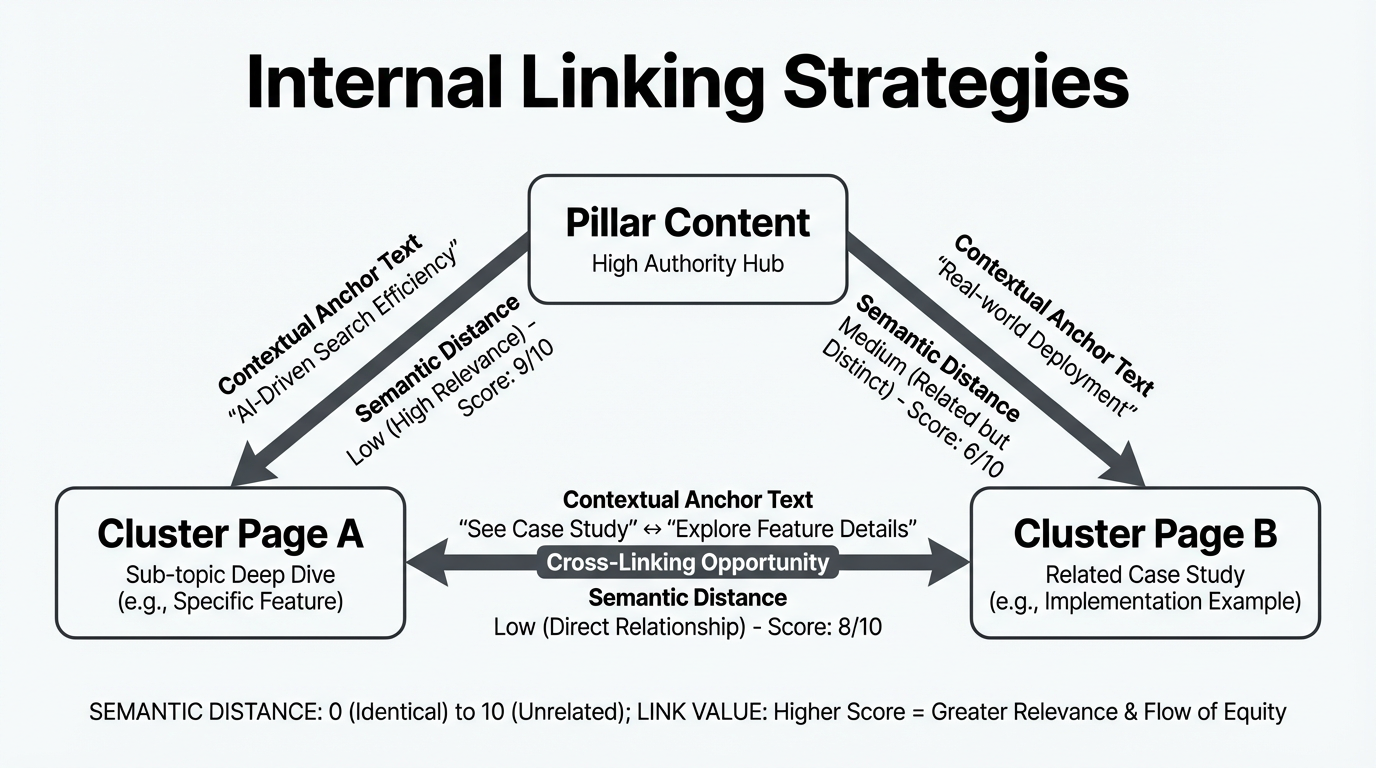
A topic cluster approach treats your content as interconnected entities rather than isolated pages. Each pillar page (a broad topic like "internal linking") connects to multiple cluster pages (subtopics like "anchor text optimization," "topic clusters," "broken link fixes"). Cluster pages link back to the pillar and to related clusters.
This structure is not just for humans. It signals entity relationships to AI. When a page about "JavaScript closures" links to a page about "JavaScript scope," and both link back to a pillar on "JavaScript tutorials," the link topology tells AI that these pages are semantically related and belong to a coherent knowledge structure.
Map your clusters by identifying your top ten to twenty pillar topics. For each pillar, list six to twelve cluster topics that support or elaborate on it. Then identify one to three supporting pages per cluster (definitions, tools, examples). Use a spreadsheet to document this structure before implementing links. Include columns for page URL, current link count, depth from homepage, and which pages should be linking to it.
Semantic analysis tools that work off-line, analyzing topical relationships between pages rather than scanning for keyword co-occurrence, produce more useful suggestions from this kind of cluster map. A page about "WordPress caching" should be linked from pages about "site speed" and "database optimization" because those topics are related, not because all three pages happen to mention the word "cache."
Designing two-way flows between pillars and clusters
Most internal linking guides recommend linking downward: from pillars to clusters to supporting pages. That one-directional flow does distribute authority downward, but it misses the reciprocal benefit. Two-way linking between pillars and clusters improves crawl depth and creates semantic loops that help AI understand bidirectional relationships.
In a traditional hub-and-spoke model, the pillar (hub) links to all cluster pages (spokes), but spokes link back only to the hub. This works for authority distribution but creates crawl inefficiency. When a crawler lands on a cluster page, it must return to the pillar to discover other clusters; it cannot traverse directly between spoke pages.
Instead, implement bidirectional linking. From a pillar like "Internal Linking Best Practices", link to all relevant cluster pages: "Anchor Text Optimization," "Topic Clusters," "Link Velocity." From each cluster page, link back to the pillar. Additionally, link related cluster pages to one another, since "Anchor Text" and "Topic Clusters" both discuss semantic relevance and a reader or crawler moving between them should not have to return to the hub first.
The structural benefit is straightforward. In a hub-and-spoke model with ten clusters, a crawler on cluster 1 needs at least two links (back to hub, then to cluster 2) to reach any other cluster. With cross-cluster linking, cluster 1 reaches related clusters in a single hop. That reduces the average link distance between semantically related pages, which affects how Googlebot allocates its crawl across your site. Pages that are logically related should be structurally close. Research from Koanthic emphasizes the importance of Hub-and-Spoke models and PageRank distribution in modern SEO strategies.
Exit-intent linking to preserve session duration
Most internal linking strategy focuses on homepage-to-content or pillar-to-cluster flows. What gets skipped is the end of a deep article. Exit-intent linking is the practice of placing specific internal links at the bottom of an article to capture users who have reached content end.
Consider a user reading a 3,000-word article on "advanced SQL optimization." They find their answer halfway through and might close the tab. Placing a related article at the bottom, such as "Common SQL performance pitfalls" or "SQL indexing strategies for large datasets," gives them a clear next step. If the link is genuinely relevant, some users click through rather than leaving.
This affects session metrics directly. Whether engagement signals like bounce rate influence rankings is a contested question, and Google has explicitly denied using Google Analytics data as a ranking input. But longer sessions and deeper page visits do mean more opportunities for users to convert, subscribe, or share, which have downstream effects on the signals that do affect rankings.
Implementation: at the end of every article, add an "Up next" or "Related articles" section with two to three internal links. Prioritize links to pages that are topically relevant and that have lower traffic or weaker internal link equity than the current page. If you are writing about a niche topic with few inbound internal links, placing it as the "up next" link on three to four higher-traffic pages in the same cluster accelerates its crawl frequency and visibility.
Developing an internal link building strategy at scale
Internal link building is the ongoing process of adding contextual links to new and legacy content to maintain a healthy link topology as your site grows. For sites under 500 pages, manual link placement is feasible. Beyond that, you need systematic workflows.
For a site with 2,000 or more pages, internal linking becomes a maintenance task similar to technical SEO audits. You cannot review every page manually. Instead, define rules: every new article gets linked from two to three related pillar or high-traffic pages. Every cluster page gets a link back to its pillar. Every page with fewer than two internal links (excluding navigation) gets flagged for enrichment.
Mass-updating anchor text on legacy content
Older content often contains anchor text that was useful five years ago but is now outdated or poorly aligned with your current pillar-cluster structure. Updating hundreds of old links one by one is not sustainable. Use a combination of database queries and REST API calls to batch-update anchor text.
First, audit legacy anchor text using Screaming Frog or a WordPress plugin that exports your internal link graph. Generate a report listing all internal anchor text, frequency, and target pages. Identify anchors that no longer reflect current terminology or that conflict with your pillar-cluster structure.
Second, use WordPress REST API endpoints to update posts programmatically. Write a PHP or Python script using the REST API to search post_content for specific anchor text patterns and replace them. For example, replace all instances of <a href="/old-seo-guide">old SEO</a> with <a href="/modern-seo-2026">modern SEO strategies</a>.
Workflow:
- Export all internal links from your site using Screaming Frog or the Ahrefs API.
- Identify anchor text that appears more than five times and is either generic ("click here," "read more") or outdated.
- Create a CSV mapping: Original Anchor Text, Target URL, New Anchor Text, Post IDs to Update.
- Write a PHP script using the WordPress REST API to iterate over the Post IDs and update post_content where the old anchor appears.
- Use WP-CLI's
wp search-replacecommand on a staging environment for bulk database replacements. The correct syntax iswp search-replace 'old anchor text' 'new anchor text', not a piped combination of search and replace commands. - Test on a staging site first. Verify that links are still clickable and that the HTML structure is intact.
- Deploy to production in batches of 100 to 200 posts per day to avoid overwhelming the database.
For headless WordPress or decoupled setups, use the wp-json/wp/v2/posts endpoint with a PATCH request to update the post_content field directly.
Automating suggestions without hurting Core Web Vitals
Automating internal link suggestions is tempting, but most linking plugins query the database on every page load to generate suggestions. That adds server latency and increases Time to First Byte, which directly affects Core Web Vitals scores. The amount of latency added depends on database size and server configuration, and the problem compounds on larger sites where query complexity grows with post count.
A better approach separates suggestion generation from deployment. Run semantic analysis offline or on a scheduled batch job. Store results in a lightweight JSON file or a separate database table. On page load, links are either pre-rendered in post_content (static) or pulled from a cached layer (dynamic). Page load time is unaffected.
Traditional plugins typically follow this path on every page load: query post metadata, run a similarity lookup across all posts, render link suggestions, then serve the page. The problem with that sequence is that the similarity lookup is computationally expensive and should never run in the critical path of a page render.
Optimized alternatives work differently:
- Semantic analysis runs on a schedule, not on page load. This is computationally expensive and belongs in a background process.
- Suggestions are deployed via WordPress REST API with review or auto-approve workflows, so the page itself just renders static links.
- Caching suggestions in Redis or a lightweight key-value store removes the database query from the page render entirely.
- For sites with Yoast SEO or RankMath installed, use their APIs rather than competing with their own database queries at render time.
WPLink handles this by running all semantic analysis locally on your desktop, then deploying approved links to WordPress via REST API. No analysis runs during page load, so Core Web Vitals scores are not affected regardless of how many link suggestions the tool generates. According to LinkWhisper, separating suggestion generation from deployment is crucial for maintaining performance while scaling internal linking strategies.
How to fix broken internal links
Broken internal links (404s from internal sources) hurt crawl efficiency and lose link equity. Fixing them requires identifying 404s, categorizing them, and either restoring the page or updating the link to a working URL.
-
Run Screaming Frog in full crawl mode. Export the crawl report and filter for HTTP response codes 404, 410, and redirects (301, 302). Download as CSV.
-
Separate 404s into three categories: permanently removed pages, pages that moved to a new URL, and pages that should be restored.
-
For pages that moved to a new URL, identify which internal pages link to the old 404 URL using Screaming Frog's inlinks report. Update those internal links to point directly to the new URL rather than relying on a redirect chain.
-
For permanently removed pages, decide whether to redirect to a parent or category page. If the content was high-traffic or had meaningful backlinks, redirect to the closest topical match. If it was marginal, a 404 is acceptable, but remove or update any internal links pointing to it.
-
For pages that should be restored, check your backup or version control. If a page was accidentally deleted, restore it. If it was intentionally removed but still receives internal links, either update those links to a replacement page or restore a version of the original.
-
For external backlinks pointing to your 404 pages, use Ahrefs or Screaming Frog's broken external links report to identify which domains link to dead URLs. Google Search Console's External Links export can supplement this, but it does not automatically isolate 404 pages, so cross-reference it with your crawl report. For high-authority external links hitting a 404, prioritize restoring the page or setting up a redirect.
-
Monitor 404s via Search Console regularly. For sites with fewer than 500 pages, quarterly checks are sufficient. For sites between 500 and 5,000 pages, check monthly. For sites above 5,000 pages, check weekly or use continuous monitoring tools. The Coverage report under Indexing will surface 404 spikes. Fix new broken links within one week of detection.
-
After implementing redirects, check the crawl depth of the destination page. Redirects add a hop. If an old page was two clicks from the homepage and you redirect it to a page that is four clicks deep, the destination's crawl priority has effectively decreased. Add internal links to bring the destination closer to the root if it matters strategically.
Frequently asked questions
How many internal links should each page have?
Google's guidance on internal links focuses on quality over quantity, recommending that links be useful and avoiding excessive linking. There is no published per-page number. In practice, a typical blog post benefits from three to five contextual internal links to related content, though this scales with length. A pillar page covering a broad topic reasonably links to ten or more cluster pages because those connections are genuinely useful. One relevant link from a high-traffic page outweighs several marginal ones.
What is the difference between semantic and keyword-based internal linking?
Keyword-based linking scans posts for specific words and links to any page containing that word. If you write about "internal linking," keyword-based tools link to every post mentioning those words, including tangentially related ones. Semantic linking understands that a post about "topic clusters" is related to a post about "pillar pages" even if terminology does not overlap. The result is fewer but more contextually appropriate suggestions.
Does internal linking affect mobile rankings differently than desktop?
Google's primary index is mobile-first, but internal link topology is evaluated the same way for both. The same link structure serves mobile and desktop crawlers. Mobile crawl rates can differ from desktop in some configurations, which makes shallow internal link structure more important on mobile-heavy sites. Ensure all critical pages are reachable within three clicks on mobile navigation, not just desktop menus.
Can internal links have nofollow or sponsored attributes?
Yes, but they pass no link equity. Using nofollow on internal links is generally counterproductive because it prevents crawl equity from flowing through those links without preventing the page from being crawled. Reserve nofollow for user-generated content, affiliate disclaimers, or pages you explicitly do not want to rank. All other internal links should be standard follow links.
How often should I audit internal links?
For a static site under 500 pages, quarterly audits are adequate. For sites with 500 to 5,000 pages, audit monthly. For sites above 5,000 pages, audit weekly or use continuous monitoring. The main metrics to track: orphan pages reachable only via sitemap, pages with no internal links at all, and 404 errors from internal sources.
Actionable takeaways
- Define your internal link architecture before adding links. Map pillar pages, clusters, and dependencies. Keep critical category pages within two to three clicks of the homepage per Google's crawl budget guidance.
- Implement bidirectional linking between pillars and clusters. Cluster pages should link back to their pillar and to related clusters in the same topic area. This reduces average link distance between semantically related pages.
- Place exit-intent links at the end of articles to give readers a clear next step. Link to topically adjacent content that adds value beyond the current page.
- For sites over 2,000 pages, batch-update legacy anchor text using database queries and REST API calls. Use WP-CLI's
wp search-replacecommand for bulk replacements on staging before deploying to production. - Separate link suggestion generation from deployment. Semantic analysis is computationally expensive and should run as a background or scheduled process, never in the critical path of a page render.
- Fix broken internal links on a schedule matched to your site size. Use Screaming Frog to crawl for 404s, categorize them, and update links or set up redirects. External backlinks pointing to 404s are the highest priority.
- Use Ahrefs to track internal link equity distribution and anchor text ratios. Check whether newly published pages are receiving adequate internal link support relative to their topical importance.
- Implement breadcrumb schema markup using BreadcrumbList in JSON-LD. Breadcrumbs provide additional crawlable paths between pages and help maintain low crawl depth (clicks from homepage) for intermediate pages in your hierarchy.
- Document your internal linking structure in a shared spreadsheet or wiki. Anyone adding content to your site needs to understand the pillar-cluster map to place links correctly.
Related Reading
- How to automate internal links – A step-by-step guide to implementing internal linking automation without compromising performance.
- Internal linking for SEO – Explore how internal linking impacts SEO and how to optimize it for search engines.
- Best internal linking tools – A curated list of tools to help you manage and optimize your internal linking strategy effectively.