How to implement internal linking best practices for AI search and semantic SEO
Prerequisites: What you'll need
Before starting, gather these tools and resources:
- A site crawl from Screaming Frog SEO Spider, Ahrefs, or Semrush (to map your current link structure and identify orphan pages)
- Google Search Console access (to monitor crawl efficiency and indexation rates)
- A text editor or spreadsheet to document your pillar pages and content clusters
- WordPress admin access with the ability to install plugins (if using automation workflows)
- Yoast SEO or Rank Math installed and configured
- A vector-based semantic analysis tool or API access (to match content semantically rather than by keyword string matching)
- 2 to 4 hours for the audit phase; 1 to 2 weeks for deployment depending on site size
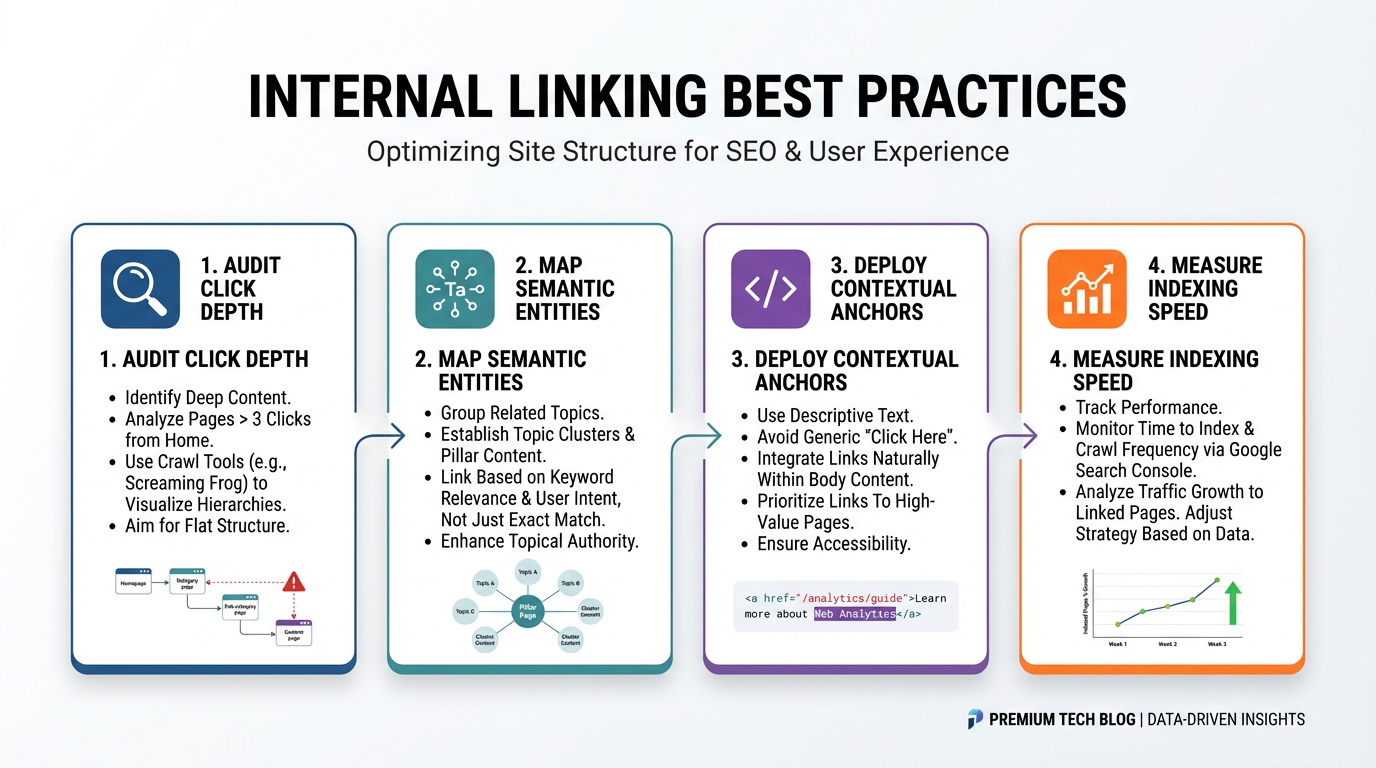
Step 1: Audit your site structure to identify orphan pages and click depth violations
Orphan pages are content that receives zero incoming internal links, making them invisible to crawlers and users alike. This creates a compound problem: orphan pages don't get crawled efficiently, they don't receive link equity, and they never surface as internal linking opportunities when you publish new content.
Run a full site crawl using Screaming Frog or Ahrefs. Export the crawl data and filter for pages with zero incoming internal links. On large sites with 1,000 or more pages, it's common to find a substantial share of orphaned content — sometimes north of 20% on sites that have grown without a deliberate internal linking strategy.
Next, calculate click depth: the number of clicks required to reach each page from your homepage. Priority content should require no more than three clicks. Root a decision tree from the homepage, count the number of hops to each target page, and flag anything beyond three levels deep.
Actionable output: Create a spreadsheet with three columns: (1) orphan page URL, (2) current click depth, (3) recommended parent page for linking. Prioritize orphans that match your top-traffic topics or revenue-generating content. Skip orphans that are outdated, duplicate other content, or no longer serve a business goal.
Warning: Do not link to every orphan indiscriminately. Linking thin or low-quality content dilutes link equity and signals poor editorial judgment to search engines. Link only to content that has been updated, contains real depth, or serves a specific goal.
Expected outcome: A ranked list of priority pages that need incoming links, organized by click depth and traffic potential.
Step 2: Map your content into semantic entity clusters and topic pillars
Semantic entities are thematic concepts that search engines and AI models recognize as related, independent of exact keyword matching. Unlike keyword matching, which looks for exact or partial text overlap, semantic entity mapping recognizes that "internal links," "inbound links," and "site link structure" all relate to the same concept. This distinction matters because Google's AI Overviews rely on entity relationships to construct citations — not keyword co-occurrence.
Start with your top traffic-driving content. Identify 3 to 8 pillar pages: comprehensive pages that cover your core topic clusters. A pillar for a WordPress security blog might be "WordPress security best practices" or "How to harden WordPress against attacks." Pillars should target high-intent keywords and carry internal authority through crawler traffic and backlinks.
Next, group related content under each pillar. These cluster pages address sub-topics within the pillar's theme. If your pillar is "WordPress security best practices," clusters might include "How to choose a WordPress security plugin," "Disable XML-RPC in WordPress," "Set up two-factor authentication on WordPress," and "Best practices for WordPress password management." Each cluster should contain 10 to 30 related pages that share semantic overlap but differ in intent or specificity.
When pillar pages link to cluster pages thematically and cluster pages link back to the pillar, you signal to Google and AI models that your site is an authoritative source on that topic. The link structure becomes a graph of semantic relationships, not just a directory of keywords.
Actionable output: Build a simple table with pillar pages in the left column, cluster pages grouped beneath each pillar in the middle column, and linking status in the right column: "linked," "needs link," or "no opportunity."
Expected outcome: A clear map of your site's topical authority structure, with orphan pages now assigned to a semantic cluster.
Step 3: Calculate optimal link equity distribution across your site hierarchy
Link equity (sometimes called PageRank) is the ranking authority a page passes to other pages through internal links. When a high-authority page links to five other pages, it divides its equity among those five. Reduce the outgoing links to three and each target receives proportionally more.
Google Search Central documentation on link crawlability confirms that PageRank distributes mathematically across all outgoing links on a page. Every internal link decision is a trade-off: more links spread equity thinly; fewer links concentrate it on priority targets.
Identify your authority anchors: pages with the highest crawl frequency, traffic, and backlinks. For most sites this is 5 to 15 pages, typically the homepage, main navigation pages, cornerstone guides, and high-traffic blog posts. These are your starting points for distributing equity downward.
Then audit the link load on your homepage. Count all outgoing internal links. If you have 160 outgoing links (common for sites with large footers and sitewide navigation), reducing to 50 to 60 by consolidating navigation means each remaining link passes more equity.
A concrete example: a homepage linking to 30 internal targets passes roughly 3% of its distributable PageRank per link (100 divided by 30). The same page linking to 60 targets passes roughly 1.7% per link. Cutting to 15 targets raises each to roughly 6.7%. For a pillar page targeting high-value clusters, this concentration has a real effect on how much authority each target accumulates.
Translate this into a distribution document: for each pillar page, list the 5 to 15 cluster pages it should link to. For the homepage, note which pillar pages receive the most equity — typically your top 3 to 5 content pillars. Do not treat every link as equal weight; use this to prioritize high-intent, high-traffic targets.
Expected outcome: A distribution map showing which pages should link to which, and roughly how many incoming links each target page should receive. This is your deployment roadmap.
Step 4: Transition your anchor text from exact-match keywords to semantic variations
Exact-match anchor text repeats the target keyword identically — for example, linking to a page titled "WordPress security best practices" with the anchor text "WordPress security best practices" every single time. Repeating the identical anchor across many links triggers over-optimization signals and wastes the semantic context you could otherwise provide.
Compare these anchor text approaches:
| Anchor text type | Example | Use case | Frequency target |
|---|---|---|---|
| Exact match | WordPress security best practices | Pillar pages, once max | 1 per 10 links |
| Partial match | Security best practices | Natural context fit | 3 per 10 links |
| Semantic/topic | How to secure your WordPress site | Entity-rich variation | 4 per 10 links |
| Brand + topic | WPLink internal linking guide | Branded pillar content | 1 per 10 links |
| Question/curiosity | Want to know what WordPress security looks like? | User intent match | 1 per 10 links |
Instead of forcing "WordPress security best practices" into every link, distribute anchor text across semantic variations that Google and AI models recognize as related to the same entity. A language model parsing your content treats "securing your WordPress install," "harden your WordPress," and "WordPress security best practices" as references to one concept. Repeating the exact phrase adds nothing new to that understanding.
Audit your existing anchor text using Ahrefs or Rank Math. Look for pages where the same keyword anchor appears five or more times pointing to the same target. Flag these for diversification and rewrite anchors using the table above as a guide.
When an AI model extracts citations from your page to construct a search result summary, it looks for contextually relevant anchor text that reads naturally. Semantic anchors give the model multiple valid phrasings and entity relationships to work with. Exact-match anchors, repeated identically, provide no new semantic information.
Warning: Anchor text diversity follows diminishing returns. Beyond about 12 unique variations per target page, additional variants show no measurable ranking lift. Stop at 8 to 12 well-distributed variations per high-priority page.
Expected outcome: A revised anchor text list where each target page receives 8 to 12 anchor variations, distributed across 3 to 5 pages within the same cluster linking to that target.
Step 5: Deploy bidirectional links between pillar and cluster content
Bidirectional linking means creating links in both directions: pillar-to-cluster and cluster-to-pillar. One-directional linking — only flowing top-down — leaves half the equity and semantic signal on the table. Bidirectional links let AI models understand the full relationship between your content pieces.
Start with pillar pages. Each pillar should contain 10 to 20 contextual links pointing to its cluster pages. Place these within body content (not footer or sidebar navigation) and embed them naturally in paragraphs that discuss the related topic.
Example structure for a pillar on "WordPress security best practices":
"Before choosing a plugin, understand the difference between active and passive scanning. [Link to 'How to choose a WordPress security plugin'] Most small sites should focus on basic hardening first: [link to 'How to harden WordPress against attacks'], then move to [link to 'Two-factor authentication setup'] after establishing baseline security."
Cluster pages then link back to the pillar with a single, high-priority anchor. Place this link within the first 100 to 200 words to signal that this content supports the pillar's broader authority.
Also link sibling pages (other cluster pages under the same pillar) to each other when they cover related concepts. If two cluster pages both address "password security," they should link to each other to reinforce topical relevance. Limit sibling links to 1 to 3 per page to keep the topic hierarchy clear.
Actionable workflow:
- Open your pillar page in the WordPress editor.
- Identify 1 to 2 sentences per cluster page where a contextual link fits naturally.
- Insert the link with a semantic anchor from your Step 4 list.
- Open the corresponding cluster page and add one pillar link within the first 200 words.
- For sibling cluster pages, add 1 to 2 cross-links where they discuss related subtopics.
Expected outcome: A fully linked topical cluster where the pillar passes authority downward, cluster pages reinforce the pillar, and sibling pages support each other thematically.
Step 6: Automate internal link discovery using vector-based semantic analysis
Vector-based semantic analysis works differently from keyword matching. Keyword-matching tools scan content for exact or partial text overlap — searching for the string "WordPress plugin" to find linking opportunities. Vector-based tools convert content into numerical representations in a semantic space, where proximity indicates conceptual similarity, not text overlap.
For sites with 1,000 or more pages, manual linking becomes impractical. Automation solves the speed problem but introduces a different risk: tools that use exact-match detection create false positives when keywords overlap accidentally. A "WordPress security" article and a "WordPress performance" article both contain the word "WordPress" but are semantically distinct topics. Exact-match tools treat them as linking candidates.
Vector-based matching avoids this by understanding context. It recognizes that "password hashing" and "bcrypt algorithm" are semantically related security concepts, even if they share no exact text. It also recognizes that "WordPress hosting options" is not semantically related to your security pillar, even if both mention "WordPress."
Three practical approaches:
Approach 1: AI API integration with BYOK Use the OpenAI, Anthropic, or a local model (Ollama, LLaMA) embedding API. Extract content from target pages, compute semantic embeddings for each page in your cluster, then find pages with the highest vector similarity to your new article. Some content management systems and plugins now support this natively.
Approach 2: Desktop semantic analysis tools Tools like WPLink analyze your WordPress site content locally without uploading pages to external servers. The application generates internal linking suggestions based on semantic relevance rather than keyword matching, which reduces false positives. Local processing is particularly useful if your content contains proprietary or sensitive information.
Approach 3: DIY Python script For developers, write a script that extracts your site content via the WordPress REST API, computes embeddings using a free model like Sentence Transformers, then compares vectors to identify semantic overlap. Filter results by a minimum similarity threshold (0.7 cosine similarity is a reasonable starting point) to eliminate weak matches.
Implementation checklist:
- Extract all content from your target cluster via REST API or direct database query
- Compute semantic embeddings for each page in the cluster
- For each new article, compute its embedding
- Find pages with similarity scores above 0.65 to 0.75 (adjust based on testing)
- Generate a ranked list of linking recommendations sorted by relevance score
- Apply the anchor text variations from Step 4 to each recommendation
- Review all suggestions before publishing — do not enable auto-approve until you have validated quality manually on at least 50 suggestions
The practical advantage of semantic tools over keyword-based ones is narrower, more relevant suggestion lists. When you're reviewing 20 suggestions per article instead of 80, your editorial time goes toward verifying relevance rather than filtering noise.
Expected outcome: An automated workflow that generates 10 to 30 linking suggestions per new article, ranked by semantic similarity score, ready for editorial review before deployment.
Step 7: Measure the ROI of your internal linking updates
Measuring impact requires tracking before-and-after metrics across three dimensions: crawl efficiency, indexation, and rankings. Internal linking does not directly cause ranking gains. It enables crawlers to discover content faster, which often correlates with faster ranking changes when other factors — content quality, page speed, backlinks — are already solid.
Establish a baseline one week before deploying large-scale internal linking updates. Record:
- Crawl budget utilization: In Google Search Console, go to Settings, then Coverage. Record the number of pages crawled per day.
- Index coverage: Note the total indexed pages in your Google Search Console index report.
- Average ranking position: Use Ahrefs, Semrush, or Google Search Console's Performance report to export average position for your 20 top-priority pages.
After deploying internal links, track the same metrics weekly for 4 to 8 weeks:
- Crawl budget: Expect an increase in pages crawled per day after fixing orphan pages and reducing click depth. The size of the improvement depends on how many orphans you resolved and how deep they were.
- Indexation speed: Pages linked from high-authority pages typically get indexed faster than orphaned pages — though exact timelines vary based on crawl budget, domain authority, and how frequently Google visits your site.
- Position changes: Cluster pages often improve rankings on their primary keyword after being consolidated into a topic cluster, because Google now has clearer topical authority signals to work with.
Reporting template:
| Metric | Week 0 (baseline) | Week 4 | Week 8 | Change |
|---|---|---|---|---|
| Pages crawled per day | [X] | [Y] | [Z] | ±% |
| Indexed pages | [total] | [total] | [total] | ±% |
| Avg position, pillar pages | [X] | [Y] | [Z] | ±% |
| Avg position, cluster pages | [X] | [Y] | [Z] | ±% |
| New pages indexed (7-day window) | [N] | [N] | [N] | Δ |
Connect these metrics to business impact. If your site has 2,000 indexed pages and crawl budget improves by 25%, Google is crawling an additional 500 pages per week. If those pages were previously orphaned and contain revenue-generating or pillar-supporting content, they now have a realistic path to ranking. Estimate traffic impact by multiplying newly crawled pages by your average organic CTR for your niche.
Warning: Do not expect large ranking changes after a single internal linking update. Internal linking alone does not create ranking lift if other factors are weak (page speed, content quality, domain authority, backlinks). It enables efficient crawling and topical authority signals. Pair it with content updates and strategic external link building for measurable results.
Expected outcome: A documented report showing crawl efficiency gains, indexation improvements, and early ranking signals for high-priority pages.
Troubleshooting: common mistakes and how to fix them
Too many links on your homepage diluting equity to unimportant pages Symptom: Low click-through rates on important internal links; homepage crawl budget underutilized. Fix: Audit your homepage footer. Many site footers contain 50 or more links to category pages, archives, and low-traffic content. Remove footer links and route them to a sitemap.xml instead. Google crawls sitemaps efficiently without those links diluting homepage link equity. Rebuild homepage navigation to show only your top 5 to 8 pillar pages, or link to them contextually within the main body content.
Cluster pages not linking back to pillars Symptom: Cluster pages rank independently but don't lift pillar page authority. Fix: Add one pillar link within the top 200 words of every cluster page. Use a high-priority anchor — the pillar's primary keyword or a semantic variation. This allows PageRank to flow back up to the pillar, which then redistributes equity to other clusters, amplifying the entire topic cluster's authority.
Orphan pages remain orphaned after audit efforts Symptom: Crawler reports still show 15% or more orphan pages after months of linking work. Fix: If content has no semantic home, adding links won't fix the underlying problem. Review each orphaned page: is it genuinely related to any pillar? If not, either delete it, merge it into a pillar page as a subsection, or create a new pillar if it covers a substantial topic. Do not force links to content that doesn't fit your site structure.
Anchor text still exact-matched across all links Symptom: Over-optimization signals in Search Console; AI models cannot extract semantic relationships from repeated identical anchors. Fix: Use Rank Math or Ahrefs Batch Analysis to export all anchor text on your site. Find any anchor used five or more times pointing to the same target page. Rewrite 50% of those repetitions using the semantic anchor variations from Step 4. Verify changes weekly.
Automation tool generating too many false-positive suggestions Symptom: Tool recommends linking unrelated pages (e.g., "WordPress security" to "WordPress hosting"); quality drops after auto-approve. Fix: Raise your vector-similarity threshold from 0.65 to 0.75 or higher. Manually review the first 50 suggestions from any automation tool before enabling auto-approve. Refine thresholds based on the false positives you identify. Some vector-based systems let you flag irrelevant suggestions so the algorithm learns your content guidelines over time.
Related Reading
- Internal linking strategy for SEO in 2026: A strategic and data-driven guide focusing on link equity and the 'orphan page' epidemic in modern SEO.
- What is an internal link?: A detailed explanation of internal links and their role in SEO.
- Internal linking for ecommerce sites: Best practices for implementing internal linking on ecommerce platforms.
- Internal linking for SaaS websites: Strategies tailored for SaaS businesses to improve SEO through internal linking.
Frequently asked questions
How many internal links should I add to a new article?
Aim for 5 to 10 internal links per 2,000 words, which works out to roughly one link every 200 to 300 words. Distribute these across different target pages within your pillar-cluster structure rather than concentrating them all on one pillar. New articles should also receive 1 to 3 incoming links from existing high-crawl-frequency pages within 24 hours of publication to accelerate indexation.
Can I use nofollow for internal links?
No. Nofollow on internal links wastes link equity without meaningful benefit. Google's documentation states it does not pass ranking authority. Reserve nofollow for external links to untrusted sources, user-generated content, or sponsored placements — cases where the linked content is not under your editorial control.
What is the ideal click depth for important pages?
Pillar pages and high-traffic content should require no more than three clicks from the homepage. High-intent content targeting competitive keywords should ideally sit within two clicks. Each additional click adds link equity loss and crawl distance. Pages deeper than three clicks may not receive enough crawl budget on high-volume sites, causing indexation delays.
Should I link sibling cluster pages to each other?
Yes, but sparingly. Link sibling cluster pages when they cover related subtopics or when a reader would benefit from reading both. Limit to 1 to 3 cross-links per page. Excessive sibling linking creates a dense internal graph that obscures topic hierarchy. The pillar should remain the semantic anchor for the cluster.
How does internal linking affect AI Overviews?
Internal linking affects AI Overviews by signaling topical authority and providing semantic context. When pillar pages link bidirectionally to cluster content, you tell AI models (and Google's ranking system) that your site is an authoritative source on that topic. AI Overviews are more likely to cite pages from topically authoritative sites. Well-structured internal links also help AI models understand the relationships between your content pieces, which improves the accuracy of citations and summaries they generate from your pages.
Can I use internal linking to fix low rankings for a specific page?
Internal linking alone won't fix a ranking problem if other factors are weak. But if low ranking is caused by poor topical authority or crawl issues, increasing quality internal links can help. A page receiving 0 to 2 internal links and ranking at position 50 or lower should receive 5 to 10 quality links from relevant pillar and cluster pages. Pair this with content updates (more depth, clearer structure) and confirm the page loads within 2 seconds. Under those conditions, seeing 5 to 15 position improvement within 4 to 8 weeks is a realistic expectation.
What happens if I change my site architecture dramatically?
Dramatic restructuring risks breaking links and disrupting crawl patterns. If you are reworking your pillar-cluster model, do it in batches over 4 to 8 weeks. Update internal links in groups of 50 to 100 pages per week, monitor crawl budget in Google Search Console, and watch for indexation issues. Set up 301 redirects for any orphaned URLs. Avoid changing URL structures unless absolutely necessary — adjust internal linking to reflect your new topical hierarchy while keeping URLs stable.