How to build an internal link mapping strategy that prunes dead paths and maps semantic hubs
Internal link mapping is the process of visualizing and deliberately connecting thematically related URLs across your site to improve both crawlability and semantic relevance. Unlike external link building, which pursues acquired authority, mapping answers a different question: which of your existing pages should reference each other, and why? When done correctly, mapped links guide both search engines and AI crawlers through your topical clusters with precision.
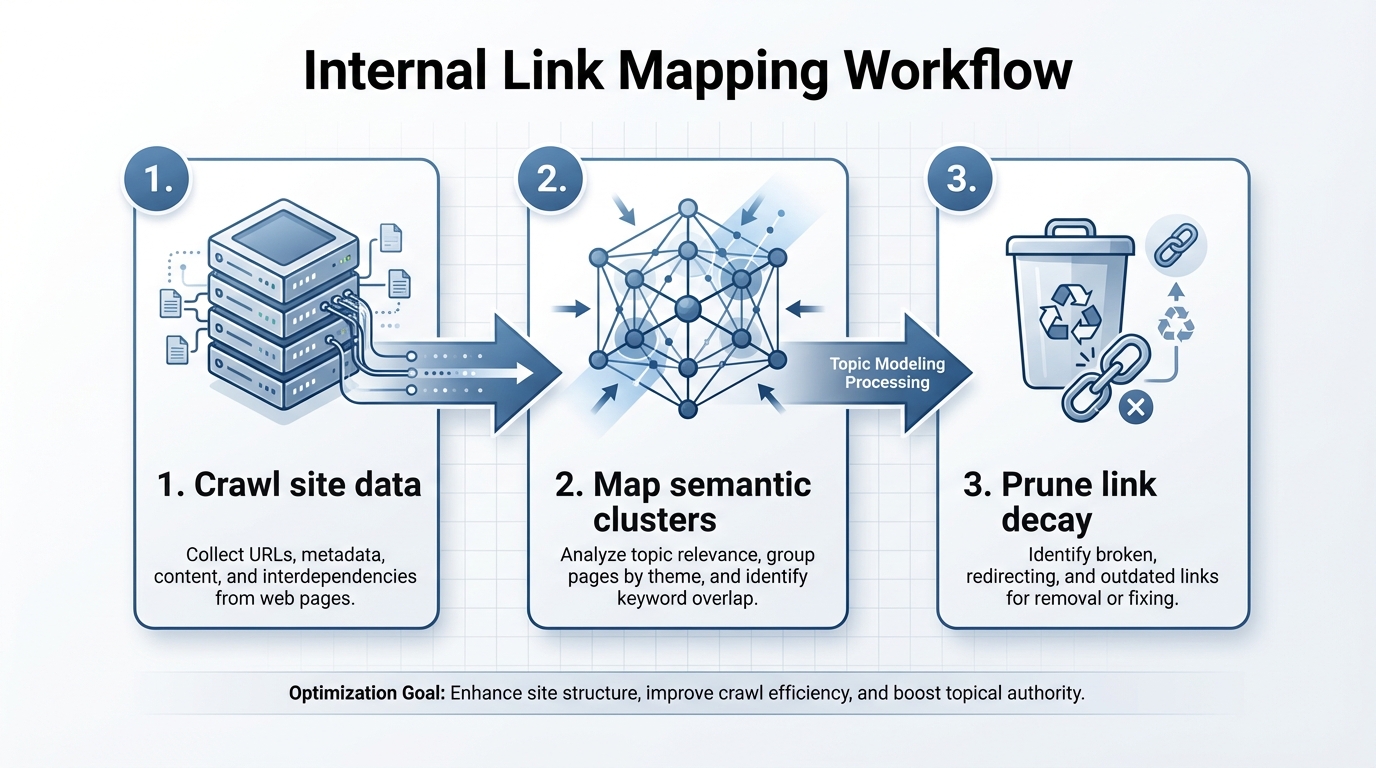
The competitive gap here is real. Most guides recommend spreadsheet-based tracking using keyword matching. Tools like Screaming Frog and Ahrefs report internal link inventory, but they leave every strategic decision to you. No competitor provides a systematic workflow for removing obsolete connections as seasonal content expires or products go out of stock. That omission is where most sites quietly bleed link equity into dead weight.
What is internal link mapping?
Internal link mapping visualizes how pages connect using topical relevance rather than guesswork. A mapped semantic hub places a central authority page at the center, with contextual links flowing outward to related subtopics. A comprehensive WordPress SEO guide, for example, becomes the hub; pages on schema markup for WordPress or SEO for WooCommerce become the spokes.
An unmapped cluster does the opposite. It scatters links randomly across topic boundaries or relies on exact-match keywords ("WordPress plugins", "best WordPress plugins", "WordPress plugins for SEO") that leave search engines uncertain about where topical authority actually lives.
Here is how they compare:
| Unmapped cluster | Mapped semantic hub |
|---|---|
| Links scattered across 40 posts with generic anchor text | 5 pillar pages with contextual links from 30 supporting articles |
| Each post links to 8 random other posts, many outside its topic | Each post links to 2-3 semantically related pages within the same cluster |
| Google crawl visits 20 pages at depth 4 or deeper, wasting crawl budget | Google crawl prioritizes hub pages within 2 clicks of navigation |
| Page relationships are opaque to AI models | Clear "belongs-to" relationships recognized by LLMs and retrieval-augmented generation systems |
The semantic hub approach works because it forces you to answer a core question: what is this page really about, and which other pages share the same topical boundary? Sites that answer that question consistently end up with cleaner crawl paths, less keyword cannibalization, and content that AI systems can confidently cite because the topic boundaries are unambiguous.
Why manual keyword matching fails for internal linking structure
Conventional spreadsheet-based linking relies on exact-match anchors, automatically linking "best WordPress plugins" to any page that contains the phrase. That approach breaks down in at least four ways.
First, keyword matching does not understand subtopic boundaries. A post about WordPress plugins for bloggers and a post about WordPress plugins for ecommerce both contain the same keyword phrase, but they serve different audiences and belong in separate topical clusters. A spreadsheet treats them as interchangeable link targets.
Second, manual tracking becomes unworkable past roughly 100 pages. A 500-post site has around 250,000 potential link pairs. Nobody audits those by hand. Sites resort to automated keyword-based insertion, which produces obvious mismatches: an article on internal linking strategy linked to an apparel product page because both mention "optimization tips".
Third, random linking compounds crawl depth problems. Pages end up five or six clicks from the homepage. Google's own crawling guidance confirms that shallow site architecture is preferable because Googlebot allocates crawl budget by priority, and pages buried deep in a site structure receive fewer crawl visits than pages reachable from the homepage in two clicks. Random linking wastes that budget on low-priority pages.
Fourth, keyword tools miss semantic relationships. Search engines and LLMs use vector embeddings to understand topical distance. "WordPress security" and "WordPress hardening" are semantically close and belong in the same cluster. "WordPress SEO" and "WordPress security" are thematically related but distinct enough to sit in separate clusters. A keyword-matching tool treats all three identically. Semantic tools recognize these boundaries and link within clusters first, then across clusters only when the connection is genuinely relevant.
The math compounds quickly. A site with 300 pages can realistically identify maybe 30 link opportunities per month manually. A site publishing 50 new posts per month falls further behind each week, and the link map becomes stale before it ever gets used.
How to prune seasonal link decay
Annual content creates hidden link debt. By mid-January, your "2025 Tax Planning Guide" is still linked from 40 other pages, now pointing to obsolete content. That wastes link equity and introduces noise into how search engines read your current topical scope.
Follow this pruning workflow to recover lost authority:
-
Identify seasonal or time-bound content. Use your site analytics or Screaming Frog to tag content by publication date. Filter for posts older than 12 months with titles containing "2024", "holiday", "Black Friday", "spring forecast", or "tax season".
-
Check if the page still receives crawl. In Google Search Console, open the Crawl Stats report and look for seasonal pages that received zero crawl in the last 30 days. Zero crawl is a reliable signal that the page is no longer earning any attention from Googlebot.
-
Audit incoming internal links. Use Ahrefs Site Audit or Screaming Frog to find every page linking to the seasonal post. Export the list with anchor text, source page URL, and link type (contextual versus footer or navigation).
-
Redirect obsolete content or remove the links. If the 2024 guide is no longer relevant, either 301 redirect it to your current equivalent, preserving equity, or noindex it. Remove or retarget all internal links pointing to the obsolete page.
-
Retarget recovered links before deleting them. Before you remove a link, ask whether it could point to a current, evergreen page in the same topic cluster. A link from a "2025 Holiday Sales" recap to your general "Sales Strategy" pillar is far more useful than a link pointing nowhere.
-
Document and monitor. Log which links were removed and which pages received the recovered equity. Check those pages for ranking changes in Google Search Console over the following four to eight weeks.
Mapping internal links for ecommerce filter pages versus product pages
Ecommerce faceted navigation creates duplicate content and crawl waste when mapped incorrectly. When a product is reachable via both "/shirts/blue/denim" and "/blue/denim/shirts", search engines must decide which URL is canonical. Incorrect internal linking signals the wrong page as primary.
The rule is straightforward: always link humans and search engines to the most specific product page. Never link to filter or facet pages unless that facet page is specifically designed as an aggregation destination.
More specifically:
-
Link from category pages directly to product pages, not facets. A "Men's Shirts" category page should link to individual SKUs using exact product titles as anchor text. Do not link to intermediate facet pages like "/mens-shirts/blue".
-
Treat facet pages as interface, not content hubs. Filter pages should be noindexed or canonicalized to the parent category. If they are indexed, limit internal links to them from breadcrumb navigation and menus only. Never link from blog content to facet pages.
-
Allow one exception: curated facet pages with original content. A page built around "best denim shirts under fifty dollars" that aggregates and reviews products is a destination page, not a filter. It can receive topical links from related blog posts about budget fashion.
-
Concentrate internal authority on product detail pages. Link to them from related product pages, blog posts covering the product's category, and seasonal guides. A blue denim shirt page can receive internal links from a "Workwear guide for women" blog pillar, a "Fall fashion trends" seasonal hub, and sibling product pages like women's denim jackets.
This structure prevents index bloat by canonicalizing facets, concentrates crawl budget on buyable SKUs, and eliminates the keyword cannibalization that happens when a facet page and a product page compete for the same query.
How local AI processing speeds up semantic link discovery
Server-side plugins that scan for link opportunities block other requests while they run. A plugin analyzing 500 pages generates database queries and template rendering on every execution, slowing TTFB (Time to First Byte) by hundreds of milliseconds. Users and Google both notice latency above roughly 100ms.
Local-first AI tools process semantic relationships offline, completely outside your WordPress server. The workflow: download your site's content, embed it into vector space using a language model, compute semantic distances between pages, surface link recommendations. All of that runs on your machine or a local GPU, never on your server, and nothing is sent to a third-party cloud.
The speed difference is significant. A vector-based semantic search completes in milliseconds once the model is loaded. A contextual relevance query such as "which pages should link to this article on internal linking" requires hundreds of database queries on a server. Run as a vector search on a local machine, the same operation takes around 50ms. No server load. No bandwidth cost. No API calls to external services.
Bring-your-own-key (BYOK) models add privacy and data control. You provide your own API key for OpenAI or Anthropic, or run an open-source model locally through something like Ollama. Your content stays on your network. For agencies managing 50 or more client sites, local processing means you can batch-process all sites in parallel without hitting cloud API rate limits or exposing client content to third-party servers. WPLink, for instance, runs entirely as a desktop application with local vector processing and BYOK support, so link recommendations are generated without any of your content leaving your machine.
Actionable takeaways
-
Map your top 10 content pillars and identify their semantic clusters. Document 3-5 supporting pages per pillar and prioritize links within clusters before you add any cross-cluster connections.
-
Audit seasonal content in Google Search Console. For pages older than 12 months with zero crawl, redirect to live content or prune the internal links pointing to them and recover that equity.
-
For ecommerce sites, enforce a consistent rule: link to product pages, never to facet pages. Canonicalize or noindex facets. Check your crawl budget report after 30 days to confirm Googlebot is concentrating on product and category pages.
-
Run a baseline internal link audit using Screaming Frog or Ahrefs. Export the link report, sort by depth (clicks from homepage), and identify every page sitting four or more clicks deep. Retarget links to bring your top 20 pages within two clicks.
-
Test semantic link suggestions against keyword-matched suggestions on a staging site or a subset of posts. Measure click-through rates and ranking movement. The difference in topical precision usually becomes visible within a single crawl cycle.
Frequently asked questions
What is the difference between internal link mapping and a sitemap?
A sitemap (XML or HTML) lists all pages on your site for crawl discovery. Internal link mapping goes further: it defines which pages should link to which other pages based on topical relevance and authority distribution. A sitemap says "these pages exist"; a link map says "these pages organize around this cluster because they share a topic and a user intent."
How often should I audit and update my internal link map?
Audit quarterly if you publish new content weekly. For ecommerce sites or high-velocity content operations, audit monthly. Set a calendar reminder to check Google Search Console crawl stats and identify pages that stopped receiving crawl. That pattern is usually the first sign that your link map is drifting out of alignment with your actual topical structure.
Can I use AI to automate link suggestions without manual review?
Yes, but with one guardrail: always review suggestions before deployment. Semantic AI surfaces opportunities faster than keyword-matching tools and with higher topical accuracy, but AI models can miss editorial context or recommend links to outdated content. A review queue where suggestions are staged, approved, and logged before going live is the minimum safeguard worth keeping. Research from TopicalMap.ai found that strategic site architecture through internal linking significantly boosts topical authority and semantic clustering.
Does internal link mapping affect site speed?
Not when implemented correctly. A single HTML link is around 100-200 bytes, which is negligible. The risk is over-linking: adding 20-30 links per page instead of a sensible 5-8 inflates payload and can increase rendering time. Keep contextual links per page in the 3-8 range and you will not see any measurable impact on Core Web Vitals.
How do I know if my link map is working?
Track three metrics: average crawl depth of indexed pages in Google Search Console (lower is better); click-through from internal links in Search Analytics; and ranking position changes for target pages within four to eight weeks of link deployment. If crawl depth is falling, internal link CTR is climbing, and target pages are moving up, the map is doing its job.
Related Reading
- What is an internal link? – A foundational guide to understanding the role of internal links in SEO.
- Internal linking for SEO – How to structure internal links to maximize search engine visibility.
- How to automate internal links – Tools and techniques for scaling your internal linking strategy.
- Internal linking for real estate – Industry-specific strategies for real estate websites.
- Glossary: Internal links – Key terms and concepts in internal linking.