What is an internal link?
An internal link is a hyperlink that points from one page within a domain to another page on the same domain. Unlike external links, which point to other websites, internal links control which pages get discovered and how authority flows within your site structure. At the HTML level, an internal link is an anchor tag referencing a URL on your own domain, appearing in navigation, body text, footers, or sidebars.
Internal links are sometimes called inbound links when referring to links pointing to a specific page, or self-links. They differ from backlinks, which are links from external domains pointing to your site. The distinction matters because you have direct control over internal link patterns, while backlinks depend on external publishers.
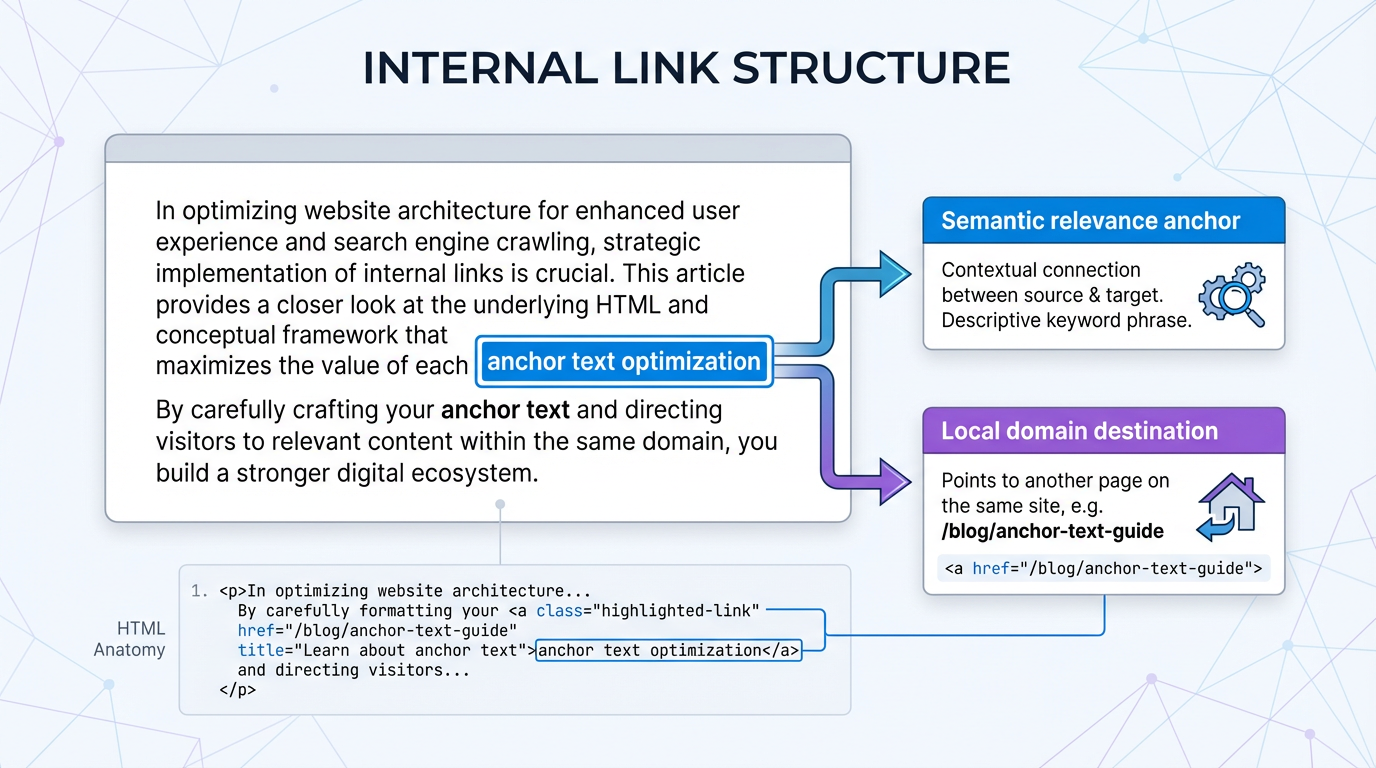
Search engines use internal link signals to determine page importance, crawl pathways, and topic relationships. A well-structured internal link graph tells Googlebot which pages are central to your site's topical focus, and it shapes how crawl budget gets distributed across your content.
How internal link density affects WordPress database queries
The performance cost of internal linking in WordPress depends heavily on how those links are generated and rendered. For static links written directly into post content, WordPress parses the post_content field on load and outputs the HTML as-is. Those links do not individually trigger separate database lookups during page rendering.
The database load picture changes when you use programmatic or automated internal linking tools. Plugins that generate links dynamically via shortcodes or runtime functions do execute queries at render time: they look up target post IDs, retrieve current permalinks from the wp_posts table, check post status, and in some cases pull metadata from wp_postmeta. The more links a tool generates dynamically per page, the more query chains run on every page load.
This distinction matters for plugin selection. A tool that bakes finalized link HTML into post_content at save time imposes a one-time write cost and no render-time overhead. A tool that resolves link targets dynamically on every page request imposes a recurring query cost that scales with traffic.
The performance impact also scales with content volume. On a site with thousands of posts, automated deployment of dense link sets across the entire library can stress shared hosting environments, particularly if query caching is not configured. According to research from LinkWhisper, the practical advice is to prefer tools that commit final link HTML to post content rather than resolving links at runtime, and to stage bulk deployments rather than pushing changes to thousands of posts simultaneously.
Database query optimization matters because WordPress stores link data in the post_content field. When dynamic link resolution is involved, heavy link density combined with uncached queries creates a bottleneck that grows proportionally with site scale and traffic volume.
Deferred link rendering vs standard internal linking for site speed
Standard internal linking renders all links directly in the HTML sent to the browser. These links are visible to users and crawlers immediately on page load. Each link is an anchor tag in the initial HTML payload.
An alternative approach defers link rendering: JavaScript injects additional links into the DOM after the initial page paint. This keeps the initial HTML payload smaller and moves link rendering to a later phase of page load, which can improve time-to-first-paint metrics on pages with a large number of links.
The trade-off is real. Crawlers that fully execute JavaScript, including Googlebot since 2020, will eventually discover deferred links. But the indexing cycle for JavaScript-rendered content typically lags behind HTML-rendered content. Crawlers operating with limited JavaScript execution, or those that abandon a page quickly, may miss deferred links entirely. Mobile crawlers with constrained resource budgets are more likely to encounter this problem.
For most WordPress sites, the practical recommendation is to keep critical links in standard HTML: links to cornerstone content, category pages, and high-value conversion destinations should never depend on JavaScript for discoverability. Deferred rendering is worth exploring only for large supplementary link sets, such as "related posts" carousels, where the links are useful but not structurally important. Before taking that approach, profile actual page load times with a tool like PageSpeed Insights to confirm whether link count is genuinely the bottleneck.
Benchmarks: internal link counts per 1,000 words
No single authoritative source publishes tested density benchmarks for internal links per 1,000 words, and anyone citing exact numbers without methodology should be treated with skepticism. What we can reason through from crawl behavior, UX research, and common editorial practice:
Blog posts and editorial content:
- Workable range: 2-5 internal links per 1,000 words
- Beyond 8-10 per 1,000 words, link relevance tends to degrade and forced links become visible to readers
- At very high densities (think 15+ per 1,000 words), user attention splits across too many destinations and the page loses a clear conversion path
Product pages (ecommerce):
- Product pages benefit from links to related products, category pages, and trust content, so slightly higher density is appropriate
- The practical ceiling is lower than pillar content because excessive links delay progression to checkout
- If a product page reads more like a navigation hub than a product description, link density is too high
Pillar and cornerstone pages:
- Pillar content is designed to distribute authority and route users into topic clusters, so higher link density is appropriate and expected
- A pillar page linking to 15-25 cluster articles serves a different purpose than a blog post, and link counts should reflect that function
- The limiting factor is content length; links should correspond to topics actually covered on the page
Database load considerations:
For dynamically generated links (runtime shortcodes or plugin-resolved links), query load scales with link count per page. The crossover point where this becomes measurable depends on hosting configuration and caching setup. On a well-cached site with object caching enabled, even 20-30 dynamic links per page adds negligible overhead. On shared hosting without query caching, the same configuration can create perceptible latency. The safe approach is to enable query caching before scaling up automated link deployments, regardless of the tool you use.
Measuring internal link CTR: manual placement vs semantic relevance
Manual internal linking produces inconsistent click-through rates because link placement depends on individual editor judgment. A single site with multiple content contributors often shows significant CTR variance across articles, simply because editors have different instincts about where and how to link.
What placement patterns actually affect CTR:
Links placed early in an article, before readers have scrolled significantly, receive more clicks than links buried late in long posts. This follows from basic reading behavior: most readers do not reach the end of a long article. Descriptive anchor text, specific enough that the reader knows what they will find on the other side, outperforms generic anchors like "click here" or single keyword anchors. Links placed at natural paragraph breaks, where a reader might pause, tend to see higher engagement than links dropped mid-sentence.
These patterns come from established UX and reading behavior research, not internal linking-specific studies. Apply them as directional principles rather than guaranteed conversion lifts.
Semantic relevance vs keyword matching:
The core difference between semantic link suggestions and keyword-matched link suggestions is this: keyword matching finds other pages that share terminology with the source article. Semantic matching identifies pages whose underlying topic directly extends or supports the concept being discussed in the source text.
A post about WordPress security contains the word "plugin" repeatedly. A keyword matcher might suggest linking to a generic plugins roundup. A semantic tool recognizes the security context and suggests the article specifically about security plugins or malware removal instead. Users click the semantically relevant link more often because the connection is obvious.
Quantified CTR comparisons between manual and automated semantic linking depend entirely on the baseline. Sites with inconsistent manual linking, common in larger teams, tend to see meaningful improvements when shifting to semantic suggestions. Sites where a single disciplined editor already links carefully tend to see smaller gains. The improvement is real but variable.
Practical implication:
If your site has more than two or three content contributors, inconsistency in manual linking is almost certainly costing you CTR. Auditing a sample of posts across contributors, looking at anchor text quality and link placement patterns, is worth doing before investing in any automation.
How to check internal linking and locate orphan pages
Orphan pages are posts or pages with zero internal links pointing to them from elsewhere on your site. Crawlers discover pages primarily by following links, so orphaned pages either go undiscovered or depend entirely on XML sitemap submission for indexing. Authority never flows to them through normal link paths.
Orphaned pages are common. Site restructuring, content migrations, and bulk publishing without linking discipline create them regularly. Auditing for orphans is a routine maintenance task, not a one-time cleanup.
Step 1: Export your site's URL inventory
Get a complete list of published URLs. In WordPress, export via WP-CLI:
wp post list --post_type=post,page --format=csv > posts.csv
Or export from the WordPress admin under Tools > Export. This becomes your baseline.
Step 2: Map inbound internal links
Run a full site crawl using Screaming Frog SEO Spider (free for sites under 500 URLs) or a paid crawler like Ahrefs Site Audit or Semrush. After the crawl, export the "Inlinks" report. Any URL in your baseline inventory that shows zero inbound links is an orphan.
Step 3: Cross-reference with Google Search Console
Google Search Console's Links report shows internal links Google has discovered. Any page missing from the internal links section or showing zero linked mentions should be investigated. Note that Search Console reflects Google's crawl state, which may lag behind recent site changes.
Step 4: Prioritize which orphans to rescue
Not every orphan warrants a rescue link. Prioritize by:
- Organic traffic: if a page receives search traffic despite being orphaned, it has SEO value worth protecting with proper links
- Topic relevance: pages that belong to an active topic cluster should be connected to that cluster
- Age and quality: old or thin orphan pages may be better candidates for consolidation or deletion than for linking
Step 5: Add contextually relevant links
Link to orphaned pages from:
- The most topically relevant pillar or cornerstone content on your site
- Recent cluster articles covering related subtopics
- Navigation elements as a last resort when no contextual placement exists
One genuinely relevant link from a related article is more valuable than several forced links from unrelated content. Crawlers and readers both recognize contextual coherence.
Frequently asked questions
How many internal links should I add to a new blog post?
Start with 2-3 links to existing pillar content or closely related cluster articles. Add roughly one additional link per 500 words beyond the first 1,000 words. Before publishing, read through the draft and remove any link that interrupts the reader's flow or leads to a page that only marginally relates to the current topic.
Does internal link anchor text still matter for SEO?
Yes. Anchor text is a relevance signal for the linked page. Descriptive anchors that reflect the destination page's actual topic work better than generic anchors or exact-match keyword stuffing. Write anchor text for the reader first: if the anchor tells someone exactly what they will find when they click, it is probably doing its SEO job too.
Can too many internal links hurt my SEO?
Yes, in two ways. First, excessive linking dilutes click attention across too many destinations, reducing CTR to any individual link. Second, if links appear forced or irrelevant, both readers and search engines recognize the pattern. For sites using dynamic link generation plugins, high link density also adds rendering overhead that can affect Core Web Vitals if caching is not configured properly.
What's the difference between internal links and navigation menus?
Navigation menus are structural links that appear consistently across every page, establishing site hierarchy. Internal links in post content are contextual, created for specific pages to show topical relationships. Both matter: navigation menus define the skeleton, contextual links in content show how topics relate to each other.
How often should I audit my internal links?
Run a full audit quarterly or after any significant content restructuring, migration, or bulk deletion. Check Google Search Console's Links report monthly for unexpected drops. If you use automated linking tools, review a sample of suggestions before bulk deployment to catch relevance problems before they spread across hundreds of posts.
Should I use nofollow on internal links?
No. Internal links between your own pages should pass authority by default. The exception is user-generated content areas, such as comment sections, where nofollow prevents spam link exploitation. Links between your own editorial content should always be followed.
How does internal linking affect mobile SEO?
The crawlability and authority flow effects are identical on mobile and desktop. The user behavior difference is real though: mobile readers navigate differently, have smaller tap targets, and are more likely to bounce when a page feels cluttered. Keep mobile-first content focused, place critical links prominently, and use anchor text clear enough that a reader on a small screen knows where a tap will take them.
What's the best tool for managing internal links on WordPress?
For sites under 100 posts with one or two content contributors, manual management with a clear linking process is sufficient. For larger content libraries, tools that use semantic analysis rather than keyword matching produce more relevant suggestions at scale. WPLink uses semantic analysis with local processing, meaning your content is never uploaded to a third-party cloud, which matters for agencies managing client sites. Yoast SEO and Rank Math include basic linking suggestions that work for smaller sites. For enterprise needs, custom REST API implementations offer the most control over deployment logic.
Is deferred link rendering recommended for WordPress sites?
Only if profiling confirms that link count is a meaningful contributor to LCP or page load time on your specific setup. For most WordPress sites, keeping critical links in standard HTML and optimizing hosting configuration (caching, CDN) is simpler and lower risk. Deferred rendering makes sense for large supplementary link sets where discoverability lag is acceptable.
How do I know if my internal linking is working?
Track three things: crawl coverage in Google Search Console's Coverage report (are pages getting indexed that weren't before?); internal link click volume in Google Analytics or a heatmap tool; and organic traffic changes to pages you have recently linked to. A successful internal linking improvement moves previously buried pages closer to the surface in crawl depth, increases link click volume, and correlates with traffic growth on the linked pages over the following 4-8 weeks. IndexCraft’s technical audit data supports this approach, emphasizing the importance of structured internal link architecture for SEO performance.
Quick-reference summary
Use this as a bookmark-friendly cheat sheet for day-to-day decisions:
Link density guidelines (per 1,000 words):
- Blog posts: 2-5 links, up to 8-10 before relevance degrades
- Ecommerce product pages: keep links purposeful; avoid turning product pages into navigation hubs
- Pillar pages: higher density is appropriate; link count should match the number of subtopics covered
Performance checklist for WordPress:
- Prefer tools that write final link HTML to
post_contentover runtime link resolution - Enable object caching (Redis or Memcached) before scaling automated link deployment
- Stage bulk deployments rather than pushing to the entire content library simultaneously
- Test Core Web Vitals before and after any large-scale link deployment
Orphan page audit workflow:
- Export full URL list via WP-CLI or Tools > Export
- Crawl with Screaming Frog or equivalent; export Inlinks report
- Cross-reference with Google Search Console Links report
- Prioritize rescue by traffic, topic relevance, and content quality
- Add one contextually relevant link from the most topically related content on the site
Anchor text principles:
- Descriptive, 3-5 words, specific to the destination page's topic
- Avoid generic anchors ("click here", "read more", "learn more")
- Never use exact-match keyword anchors on every occurrence; vary naturally
- Write for the reader: if the anchor tells them what they will find, it is working
When to audit:
- Full audit: quarterly, or after any content migration or bulk deletion
- Spot check: monthly via Google Search Console Links report
- After automated tool deployment: always review a sample before approving at scale