How to build an external linking strategy for AI search
What is external linking for SEO?
External linking for SEO is the practice of linking from your content to authoritative third-party websites to improve search visibility, establish topical authority, and help AI search engines verify claims. Unlike internal links that point to your own pages, external links (also called outbound links) point to domains you do not own. They serve two purposes: they give readers pathways to verify your claims, and they signal to search engines that your content is embedded in a broader ecosystem of expertise.
This distinction matters more for AI search systems than for traditional PageRank. Modern AI-assisted search does not penalize you for linking out. Instead, according to research from Your Marketing People, outbound links function as citation pathways that help these systems understand what your content is about and how it relates to established sources. A well-placed external link tells a search system: this claim connects to authoritative evidence at this domain.
How AI search engines process external links
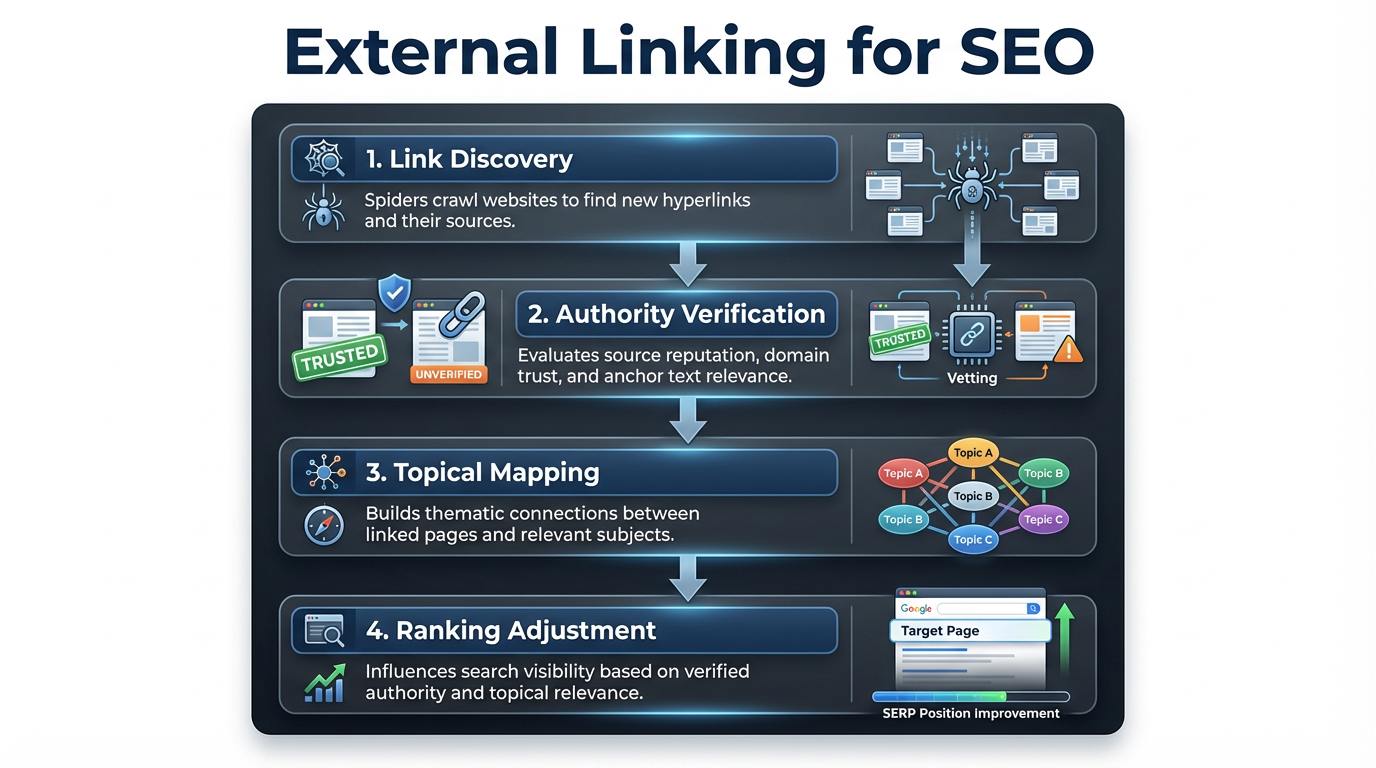
The core mechanism is simpler than most SEO writing suggests. When an AI-assisted search system processes your content, it is not just reading your words. It is also evaluating the sources you point to. A claim about AI policy linked to a primary source carries more weight than the same claim with no citation at all. This is not a new concept in information retrieval; it mirrors how academic citation analysis works, applied to web content.
The old PageRank leak myth falsely suggested that linking to other sites would drain your rankings. That framing has never accurately described how outbound links work, and it is even less relevant now. Search systems are increasingly interested in topical coherence: does your content make claims that are consistent with, and connected to, the authoritative sources on that topic?
The practical implication is how AI interprets your external link patterns. If your article is about WordPress SEO plugin installation and you link to the official WordPress plugin repository and specific plugin documentation, the search system maps you into a topical cluster around plugin management. Each external link is a node in that cluster. Vocal Media’s best practices guide emphasizes that linking to relevant, authoritative sources tells AI that your content is anchored in an established domain rather than self-referential.
Place external links immediately after the claim they support, using descriptive anchor text that names the source or concept. "According to Mozilla's HTTP security documentation" is a stronger signal than "click here for more info." The anchor text itself becomes a semantic signal that helps categorize the relationship between your page and the target.
What is the optimal external link ratio?
There is no universally verified number for external links per 1,000 words. Published studies on this specific metric are sparse, and any blog post citing a precise average from a named analysis should be treated with skepticism unless it links to the underlying data. What you can use instead is content-type logic.
For technical content, external links cluster around verification points: API documentation, SDK repositories, official specifications, relevant issue trackers. A post explaining a specific API behavior will naturally accumulate more external links than a strategy guide on internal linking, because more individual claims require a primary source. The right number is however many claims you are making that require external verification.
For strategy and opinion content, external links cluster around statistics and specific assertions. If your post makes three data-backed claims, it needs three external citations. If it makes seven, it needs seven. The mistake is treating external links as a decoration rather than a citation discipline.
The commonly repeated "3:1 internal-to-external" ratio is a structural heuristic, not a ranking factor. Use it as a sanity check if you are unsure whether you are linking out too aggressively or not enough, but do not optimize for the ratio itself.
Actionable workflow: as you write, pause after each claim that requires evidence. If the claim is based on external data, add the link before moving to the next paragraph. This forces natural link density and prevents the common mistake of backfilling links after writing, which often results in misplaced citations.
When to use nofollow, sponsored, and UGC attributes
External link attributes tell search engines how to interpret a link's relationship. For every external link you add, answer these three questions in order:
- Is this a site you trust and would personally endorse? If yes, use dofollow (the default). If no, use nofollow.
- Is this link paid, sponsored, or part of a partnership where you received compensation? If yes, add rel="sponsored". If no, continue.
- Is this link from user-generated content you did not write, such as comments or forum posts? If yes, add rel="ugc". If no, you are done.
Using dofollow for an affiliate link without disclosure creates manual action risk. Using sponsored or ugc attributes for editorial links weakens the semantic signal to search systems. The table below maps each attribute to exact use cases:
| Link type | Attribute | When to use | Example |
|---|---|---|---|
| Trusted source you endorse | dofollow (default) | Citing authoritative documentation, research, or industry experts | Linking to OpenAI's API docs from a post about GPT integration |
| Affiliate link | nofollow | Recommending a product you earn commission from | Linking to an Amazon product from a gear review post |
| Paid partnership | rel="sponsored" | Links resulting from paid placement, sponsorship, or ad deals | Linking to a SaaS sponsor from a tool roundup post |
| User comment or review | rel="ugc" | External links in reader comments or user-submitted content | A commenter's link in your site comments section |
| Unvetted source | nofollow | Sites with unknown reputation or quality | Linking to a startup's blog post from a tool comparison |
For WordPress sites managing many external links, both Yoast SEO and Rank Math let you set default link attributes and override them per link. This matters for consistency across large sites where manual markup on every link invites errors.
How to audit broken external links across a WordPress site
Broken external links are a maintenance problem that compounds over time. When a link returns a 404 or redirects to an error page, the citation that was supporting your claim is gone. For sites with hundreds of posts, manual checking is not realistic. New Frame Digital’s holistic guide recommends Screaming Frog for a reproducible workflow.
Step 1: Download Screaming Frog SEO Spider (the free version handles up to 500 URLs; the paid license removes this limit). In Configuration > Spider, set crawl depth to unlimited and ensure "follow external links" is enabled.
Step 2: Enter your WordPress site URL and run a full crawl. Crawl time varies significantly depending on your server response speed, total page count, and whether you are on the free or paid plan. For large sites, running the crawl overnight or during off-peak hours avoids performance impact.
Step 3: After the crawl completes, navigate to "External" in the left sidebar and filter by response code. Select only 4xx and 5xx codes. Export this list as a CSV.
Step 4: Sort the CSV by URL destination. This groups broken links by target domain, which quickly reveals whether a specific site has gone offline or restructured its URLs.
Step 5: For high-traffic pages, replace broken external links immediately. For lower-priority pages, batch them for a scheduled update. WordPress's built-in search-and-replace functionality can update multiple instances of the same URL across posts if the broken URL appears consistently.
Step 6: Set up ongoing monitoring through Ahrefs or Semrush for your top pages by traffic. Catching a broken citation on a page generating thousands of visits per month is worth prioritizing over a page that gets ten.
Practical tip: keep a spreadsheet of the external sources you cite most frequently, organized by topic. When a developer blog you regularly reference goes offline, you can immediately identify every post that links to it rather than discovering the breakage one article at a time.
Integrating external links alongside your internal architecture
External links do not reduce your internal link equity. This concern comes from a misapplication of the PageRank leak model, and it causes sites to ignore external linking entirely, which leaves their internal content floating without the topical grounding that comes from connecting to the wider web.
Consider how the two work together in a topical cluster. You write a comprehensive guide on WordPress internal linking strategy. You link internally to eight related posts on your site. You also link externally to Google's SEO Starter Guide and Ahrefs' documentation on link analysis. The AI-assisted search system sees your internal cluster and understands you are building topical depth. Then it sees the external links and places your cluster within the broader ecosystem of SEO expertise. The internal pages gain semantic weight from being connected to external authority, not less.
For mapping internal link clusters on WordPress sites, tools that use semantic analysis rather than keyword matching give you a more accurate picture of which pages should be connected. WPLink’s internal linking automation uses local semantic analysis to suggest contextually relevant internal links based on meaning rather than keyword overlap. Once your internal architecture is defined, external links become the bridges connecting your clusters to the wider web.
Implementation order: map your internal link structure before adding external links. This prevents the mistake of linking externally to a topic your own site already covers well. If you have a comprehensive internal post on a subject, link internally first. Add external links only for layered verification or primary sources that your own content cannot substitute for.
A post on WordPress plugin development should internally link to your other plugin content, then externally link to the WordPress plugin handbook and relevant plugin examples. The two reinforce each other rather than competing.
Related Reading
- Does internal linking help SEO? – Explore how internal links impact search rankings and user experience.
- Backlinks and SEO: Building Authority Through External Links – Learn how backlinks and external linking strategies work together to build domain authority.
- SEO Hyperlinks: Best Practices for Internal and External Links – A tactical guide to optimizing hyperlinks for search engines and users.
Frequently asked questions
Do external links directly improve my rankings?
External links do not directly boost rankings the way backlinks do. They improve rankings indirectly by increasing content credibility, improving user trust through visible citations, and helping AI search systems connect your claims to authoritative sources. Sites that link strategically to authoritative sources tend to outrank sites that do not, but the link itself is not the ranking signal. The citation context is.
Should I use target="_blank" to open external links in a new tab?
Yes, using target="_blank" for external links keeps users on your site in the active browser tab while the linked page opens separately. In WordPress, you can enable this as a default setting when inserting links through the editor, or configure it through your SEO plugin's link settings. If you are coding manually, add the attribute to all external anchor tags. Note that when using target="_blank", you should also include rel="noopener noreferrer" for security reasons.
Can I use external links on ecommerce product pages?
Yes, but with restraint. Use external links on product pages to cite safety standards, material certifications, or official brand partner pages. Avoid linking to competitor product pages. A fabric retailer can link to the official OEKO-TEX certification standard; linking to a competitor's equivalent product creates unnecessary exit friction with no SEO benefit.
How often should I audit external links?
Audit frequency should scale with your publishing volume and traffic levels, not arbitrary page count thresholds. A reasonable baseline: review external links on your highest-traffic pages whenever you do a content refresh, and run a full site crawl every few months. If a primary source you rely on heavily goes offline, treat that as an immediate fix regardless of where it falls on any schedule. Automated monitoring through Ahrefs or Semrush reduces the manual burden by alerting you to new broken links as they occur rather than during periodic sweeps.