How outbound linking impacts semantic SEO and entity authority
An outbound link is a hyperlink that points from your website to an external domain, signaling to search engines that you reference or endorse information on that external site. Unlike internal links that distribute authority within your own domain, outbound links establish your page as part of a wider web ecosystem and directly influence how semantic search engines validate page quality through entity authority signals.
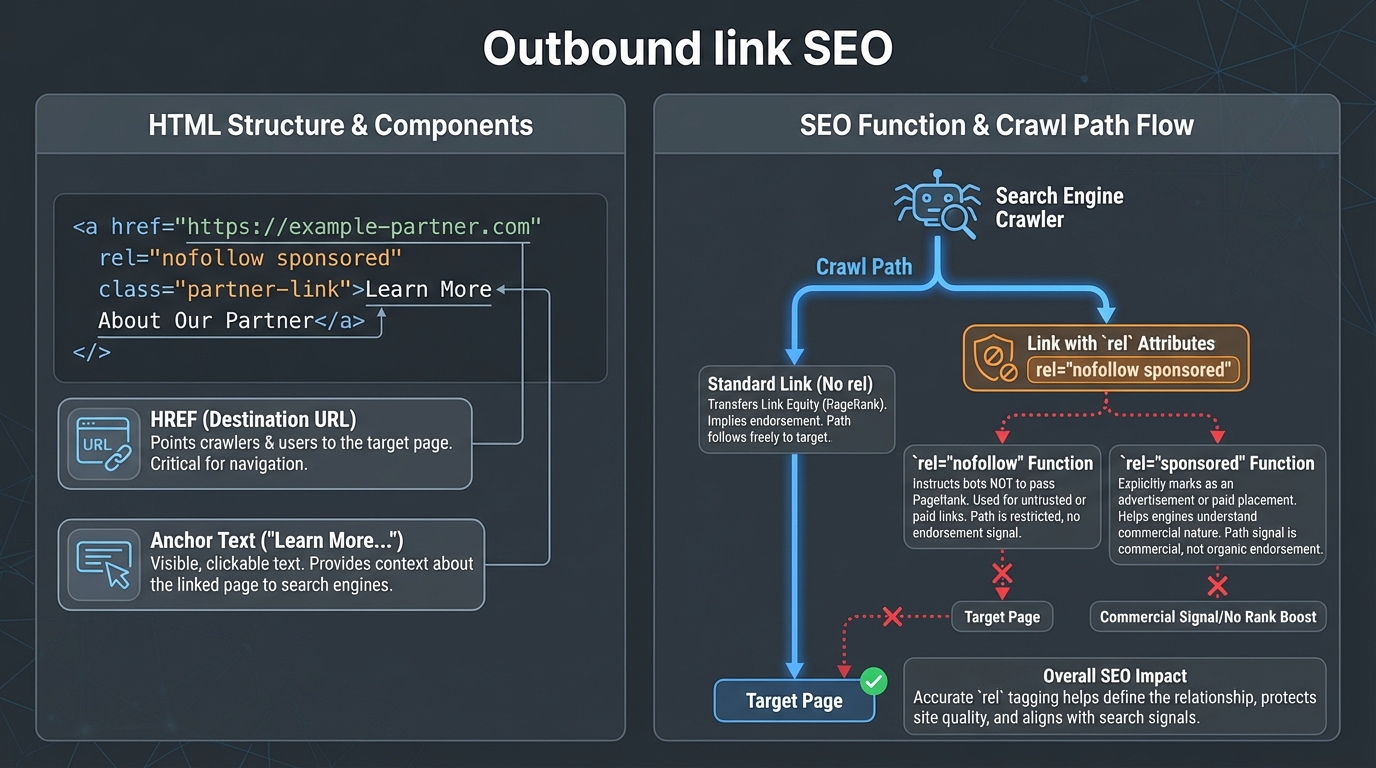
The outdated PageRank leakage debate has overshadowed what actually happens when you link out. Modern search engines don't penalize you for outbound links. Instead, they use your outbound links as one of many signals to verify whether your page contains legitimate citations within a semantic knowledge graph. That distinction matters enormously for SEO strategy, as research from Search Engine Land explains in detail.
This guide covers the technical mechanics of how semantic search processes outbound links, specific HTML implementations, workflows for auditing links across thousands of pages, and the genuine site health risks that come from misconfiguration.
What is an outbound link in SEO?
An outbound link is an HTML anchor tag pointing to a domain outside your own site's registered domain. The basic HTML structure is: <a href="https://example.com/page">anchor text</a>. The key difference between link types isn't just direction; it's the HTTP domain boundary.
Inbound links originate from external domains and point to your site. Internal links connect pages within the same registered domain. Outbound links begin on your domain and point elsewhere. When Google crawls your page, it recognizes a link as outbound by checking whether the href attribute's domain differs from your site's root domain.
The functional purpose of outbound links for search engine crawlers is discovery and validation. Crawlers follow outbound links to find new content on the web. More importantly for SEO, outbound links tell crawlers whether your page exists within a topically coherent semantic cluster. A sports blog linking to legitimate athletic research looks different to a semantic search algorithm than a content farm linking to unrelated pharmaceutical sites.
In HTML, you control the crawl behavior and authority flow of outbound links using the rel attribute. The three primary values are nofollow, sponsored, and ugc. Each signals a different relationship between your page and the destination. Understanding when to use each is essential for compliance with Google's link attribute documentation.
Outbound vs. inbound vs. internal: a direct comparison
| Link type | Origin | Destination | Primary SEO function |
|---|---|---|---|
| Outbound | Your domain | External domain | Topical citation, entity validation |
| Inbound | External domain | Your domain | Authority transfer, trust signals |
| Internal | Your domain | Your domain | Crawl path, equity distribution |
This table matters because many SEO discussions conflate the three. Outbound links are not simply "the opposite" of inbound links in a ranking sense. They serve a categorically different function: they tell search engines which external entities your content engages with, not how much ranking power flows in or out.
How semantic search engines evaluate outbound links
Semantic search engines use outbound links as entity authority verification signals within knowledge graphs. Rather than thinking about links as passive vote-counting mechanisms, think of them as citations in a research paper. When you link to an external source, you're telling the search engine: this entity is relevant to the topic I'm discussing, and I'm citing it as evidence.
Large language models and ranking algorithms process outbound links through entity disambiguation layers. Google doesn't simply count links. It analyzes anchor text, the destination domain's topical authority, the source page's topical relevance, and whether the linking pattern makes semantic sense. If you run a Python programming blog and link to TensorFlow documentation, that's a strong topical signal. If the same Python blog links to a casino site, that's a red flag.
Google's Search Quality Evaluator Guidelines specifically address outbound links as part of E-E-A-T (Experience, Expertise, Authoritativeness, Trustworthiness) assessment. Quality Raters check whether a page cites authoritative sources through outbound links. A page about medical treatments without citations to medical institutions scores lower on trustworthiness than one with multiple outbound links to relevant medical authority domains, as outlined in this guide.
The semantic validation process works through entity resolution. When you link to www.tensorflow.org/docs/api, Google's entity resolution layer identifies this as the TensorFlow API documentation entity. Your page now exists in a semantic subgraph that includes TensorFlow as a node. When dozens of pages within similar topical clusters link to TensorFlow, it reinforces TensorFlow's entity authority for machine learning topics.
This is different from PageRank transfer. You're not "leaking" authority. You're providing context about which entities your page engages with. Search algorithms use this context to map your page's topical position within the broader knowledge graph. A page with zero outbound links appears isolated from the web graph, which semantic processors can interpret as incomplete or non-specialist content.
Why entity co-occurrence matters more than link count
The specific entities you link to matter more than how many links you include. A 1,500-word article about machine learning that links to three highly relevant sources (the original transformer paper on arxiv.org, the PyTorch documentation, and a peer-reviewed study on model evaluation) builds a tighter entity cluster than a 3,000-word article with 20 links scattered across loosely related topics.
Search engineers at Google have described this as topical coherence. The web of entities surrounding your page should tell a consistent story about what the page covers. When it doesn't, ranking systems have a harder time placing your content within a specific knowledge cluster. As Respona’s analysis highlights, this coherence directly impacts CTR and indirect ranking signals.
Best practices for formatting outbound links
Proper HTML formatting of outbound links requires three decision points: anchor text selection, the rel attribute value, and target behavior. Each choice sends a specific signal to search engines.
Anchor text selection
Anchor text is the visible text users click. Descriptive anchor text helps both users and search engines understand where a link leads. Instead of "click here" or "learn more," use phrases like "Python's official documentation" or "Google's Search Quality Evaluator Guidelines." This specificity helps semantic algorithms understand exactly which entity you're linking to and why.
Compare these two versions:
- Vague:
<a href="https://docs.python.org">read more</a> - Descriptive:
<a href="https://docs.python.org">Python 3.12 official documentation</a>
The second version tells Google which Python entity the link references, which helps semantic ranking systems understand your page's narrower topical focus.
The rel attribute: when to use each value
The rel attribute controls how a link behaves within search engine crawling and ranking calculations. Here's exactly when to use each value.
rel="nofollow" tells crawlers not to pass authority or follow the link for ranking purposes. Use it for links to untrusted sources, user-generated content you cannot verify, or comments that could link to spam. Nofollow links are still crawled and the destination is still processed, but crawlers interpret them as neutral citations rather than endorsements.
rel="sponsored" explicitly marks paid links, affiliate promotions, and sponsored content. Google requires this attribute for any link where you receive payment, free products, or other compensation. This is not optional. Google's guidelines are clear that unmarked affiliate or sponsored links violate their policies and can trigger manual penalties. The correct implementation is <a href="https://example.com" rel="sponsored">affiliate product name</a>. For more on this, see our internal linking for affiliate sites guide.
rel="ugc" marks links that appear in comments, forum posts, or community contributions on your site. If your WordPress site allows comments and a commenter includes a link, that link needs rel="ugc". This tells Google the link wasn't editorially placed by your site's authority.
You can combine values on a single link: rel="nofollow sponsored" for a sponsored link in a comment section. Use this only when multiple conditions genuinely apply.
For outbound links that are editorially placed, relevant to your content, and linking to legitimate sources, use no rel attribute. These are dofollow links by default and are the appropriate choice for editorial citations.
Target behavior and security
The target attribute controls whether the link opens in the current window or a new tab. Opening external links in new tabs (target="_blank") keeps your site visible while users consult the external source. Combine this with rel="noopener noreferrer" to prevent security vulnerabilities:
<a href="https://example.com" target="_blank" rel="noopener noreferrer">external site</a>
The noopener attribute prevents the new tab from accessing your page's window object, closing a known phishing vector. noreferrer stops the referrer header from being sent. Both are worth including by default on all external links that open in new tabs.
How to audit outbound links at scale
Managing outbound links across hundreds or thousands of pages requires a crawler-based workflow. The goal is to identify broken links (404 errors), links to penalized domains, and improperly formatted link tags before they affect users or rankings. For a deeper dive into internal linking strategies, check out our comprehensive guide.
Step-by-step Screaming Frog workflow
Screaming Frog SEO Spider is the standard tool for this task.
Step 1: Configure the crawl. Enter your domain and set crawl depth to unlimited. By default, Screaming Frog only crawls internal links. Under Configuration > Spider > Crawl, enable "Crawl External Links" to include outbound links in the crawl scope.
Step 2: Run the crawl. Depending on site size, this takes anywhere from a few minutes to several hours. Screaming Frog will crawl every internal page and every outbound link destination.
Step 3: Filter the results. After the crawl completes, go to the "External" tab. Sort by HTTP status code. Look for 404 (not found), 403 (forbidden), 410 (gone), 5xx (server errors), and timeout errors.
Step 4: Triage broken links. Every 404 or 5xx link needs a decision. Check whether the destination moved (a 301 redirect means the site exists but changed URL). If the destination has a permanent 404 or 410, either update the link to the new URL or remove it. Don't leave rotting links in place because you haven't gotten around to fixing them.
Step 5: Check destination domain health. After identifying all outbound URLs, run them through a domain authority tool (Moz Link Explorer and Ahrefs both surface spam scores and domain metrics). Links to domains with high spam scores or very low domain authority, particularly in a completely different topic cluster, can weaken your page's trustworthiness assessment.
Audit frequency by site size
A site with 500 pages averaging two outbound links per page contains 1,000 external link references. Destinations go offline, get sold, or get penalized between your audits. Quarterly is the minimum audit frequency for most sites. High-traffic pillar pages deserve a monthly check, since a broken link on a page that drives significant organic traffic creates a measurable user experience problem.
Set a recurring calendar reminder and export the Screaming Frog results to a spreadsheet. Track status codes over time so you can see patterns. If a domain you link to repeatedly starts returning 5xx errors, it's a signal the site is degrading before a final 404 appears.
WordPress-specific considerations
For WordPress sites, the audit process works the same way through Screaming Frog. Some teams use plugins alongside the crawler to manage link replacements after identifying problems. However, the Screaming Frog process above provides complete visibility regardless of your CMS. Plugins that manage internal linking can also surface broken external link data if they're configured to crawl external destinations.
Common site health mistakes with outbound linking
Incorrect implementation of outbound links creates genuine technical problems. These aren't theoretical risks; they're documented policy violations and architecture issues that show up in ranking and crawl data.
Linking to penalized or low-quality domains
If you link to a domain that Google has manually penalized for spam, that association can weaken your page's trustworthiness score. Google's ranking systems interpret outbound links to spam domains as signals of lower editorial quality. The effect is proportional: one link to a questionable domain causes minimal damage, but a pattern of links to low-authority or spam-flagged domains across your site weakens topical authority assessments.
This isn't PageRank leakage. It's semantic coherence damage. Your page exists in a knowledge graph with these entities, and the graph's overall quality influences where your page is positioned within it.
Missing or incorrect rel attributes on paid links
Linking to an affiliate product without rel="sponsored" violates Google's linking policies. Google's algorithms detect undisclosed affiliate links and flag pages for manual review. This can result in pages being demoted or, in serious cases, manual actions against the entire site. The fix is simple and the risk of not fixing it is not. For more on automating this process, see our internal linking automation guide.
Ignoring link rot
Broken outbound links create poor user experience and accumulate quietly. When a user clicks a link and lands on a 404, they leave. If 10% of your outbound links are broken, you're causing users to hit dead ends 10% of the time they follow external references. Search engines track user behavior signals, and pages that consistently send users to dead ends don't hold their rankings as well as pages that don't.
Link rot doesn't happen all at once. It accumulates as sites go offline, get restructured, or get acquired and redirected. A page you published three years ago with eight external citations might have two or three broken links today without you ever noticing.
Overlinking with no contextual relationship
There's no fixed penalty threshold for link density, but semantic coherence matters. A 2,000-word article on gardening techniques with 40 outbound links to unrelated topics sends a fragmented topical signal. The practical guideline is one to three outbound links per 1,000 words of content, with each link reinforcing the page's topical focus. Screaming Frog's analysis lets you calculate your current link density: total external links divided by word count.
Poor anchor text choices
Using generic phrases like "click here," "read more," or "learn more" wastes the semantic signal that anchor text provides. These phrases tell algorithms nothing about which entity you're citing or why. Compare:
- Generic: "read more about Python"
- Descriptive: "Python 3.12 release notes and documentation"
The second version signals which specific Python entity the link references. That specificity helps semantic ranking systems understand your page's topical focus more precisely.
Not accounting for subdomain behavior
Subdomains are treated as separate entities for link attribution purposes in most configurations. A link from yoursite.com to blog.yoursite.com may be treated as an outbound link depending on your DNS configuration and how Google has crawled your site. Verify this in Google Search Console by checking which domain properties Google associates with your site. If your subdomains are listed as separate properties, links between them are being treated as outbound links, not internal ones.
Actionable checklist for outbound link strategy
Implement these steps to optimize your outbound linking for both user experience and semantic SEO.
-
Audit existing outbound links using Screaming Frog. Export the external links tab and sort by HTTP status. Fix all 404 and 5xx errors first; these are user-facing problems with immediate impact.
-
Add rel attributes to all applicable outbound links. For affiliate or sponsored links, add
rel="sponsored". For links in comments or user-generated areas, addrel="ugc". Editorially placed, contextually relevant links need no rel attribute. -
Review anchor text on all outbound links. Replace generic phrases with descriptive text that identifies the linked entity or resource. Each anchor text should function as a mini-citation that tells both users and search engines exactly where the link goes.
-
Set up quarterly audits. Schedule a recurring Screaming Frog crawl every three months. Export results to a spreadsheet and track status code changes over time. Most site health issues with outbound links accumulate gradually.
-
Check destination domain health for high-visibility pages. For pillar content and hub pages, verify that the domains you link to still have positive domain authority and no spam flags. If a previously authoritative destination has declined in quality, update or remove the link.
-
Test user experience. Open your site in a private browser window and click external links on your highest-traffic pages. Verify they open correctly. If a link is central to your argument, check it monthly.
-
Add
rel="noopener noreferrer"to alltarget="_blank"links. This is a two-minute fix that closes a real security vulnerability. If your WordPress site generates external links automatically, check whether your theme or link management tool adds this attribute by default. -
Document your linking rationale on high-traffic pages. For each outbound link on pages that drive significant organic traffic, be able to explain why that specific source was chosen. This makes it easier to assess whether links still serve their original purpose after content updates.
For teams managing outbound link audits across large WordPress sites, tools that surface broken links and missing rel attributes at bulk scale reduce the manual effort significantly. WPLink's bulk operation capabilities, for example, let agency teams audit and update link attributes across hundreds of pages without editing each post individually.
Related Reading
- Internal linking strategy for SEO in 2026: Learn how to build a future-proof internal linking framework.
- SEO hyperlinks and their impact on rankings: Understand how hyperlinks influence semantic search signals.
- Backlinks and SEO: What you need to know: Explore the relationship between inbound and outbound links.
- Inbound link check: How to audit your backlinks: A step-by-step guide to evaluating your inbound link profile.
Frequently asked questions
What is an outbound link versus an internal link?
An outbound link points from your site to a different registered domain. An internal link connects two pages within your own domain. For example, a link from yoursite.com/page-a to yoursite.com/page-b is internal. A link from yoursite.com/page-a to example.com is outbound. Google checks the root domain to classify links; subdomains may be treated as separate for link attribution purposes depending on your site's DNS configuration.
Do outbound links hurt my SEO?
No. Outbound links don't leak ranking authority or dilute your site's power. What they do is establish your page's topical relevance within a semantic knowledge graph. Without outbound links, your page appears isolated. With contextually relevant outbound links, your page appears to be part of a specialized knowledge cluster. That improves semantic ranking signals. Outbound links to low-quality, spam, or irrelevant domains can weaken your page's trustworthiness assessment, but the solution is to link carefully, not to avoid linking altogether. As Your Marketing People’s guide explains, outbound links can actually enhance your SEO when used strategically.
When should I use rel="nofollow" versus rel="sponsored"?
Use rel="nofollow" for links to sources you cannot fully verify, comments from users, or untrusted content. Use rel="sponsored" for affiliate links, paid placements, or any link where you receive compensation. These are not interchangeable. Google requires rel="sponsored" for paid links specifically. Unmarked affiliate or sponsored links can trigger manual penalties.
How do I find broken outbound links on my site?
Use Screaming Frog SEO Spider. Configure it to crawl external links, run the full site crawl, then filter the external links tab by HTTP status code. Sort to show 404, 403, and 5xx errors. For each broken link, either update the URL (if the destination moved) or remove the link (if the destination is permanently gone).
Can I have too many outbound links on a page?
There's no fixed penalty threshold, but semantic coherence matters. Too many unrelated outbound links fragment your page's topical focus and send a confusing signal to entity resolution systems. One to three outbound links per 1,000 words of content is a practical guideline. Each link should reinforce your page's primary topic.
How often should I audit outbound links?
Quarterly audits catch most problems before they affect users. Set a recurring audit every three months using Screaming Frog or a comparable crawler. High-traffic pages deserve monthly checks. The goal is to catch broken links and new spam associations before search engines crawl stale data repeatedly.
Do outbound links affect my site's crawl budget?
Indirectly, yes. Outbound links to broken domains (404 errors) waste crawl budget because crawlers attempt to follow the link and receive an error. This doesn't prevent your own pages from being crawled, but it's inefficient. Outbound links to relevant, fast-loading, high-authority domains don't significantly impact crawl budget. The main impact of broken outbound links is on user experience, not on Google's ability to crawl your site.
Does the number of outbound links on a page affect internal PageRank distribution?
This was a genuine concern in the early 2000s when PageRank was a more transparent and direct ranking factor. Today, Google's algorithms are considerably more complex, and the effect of outbound links on internal equity distribution is minimal compared to other signals. Worrying about "leaking" PageRank through outbound links is not a productive use of SEO effort in 2025. Focus on whether the links serve users and reinforce topical relevance.