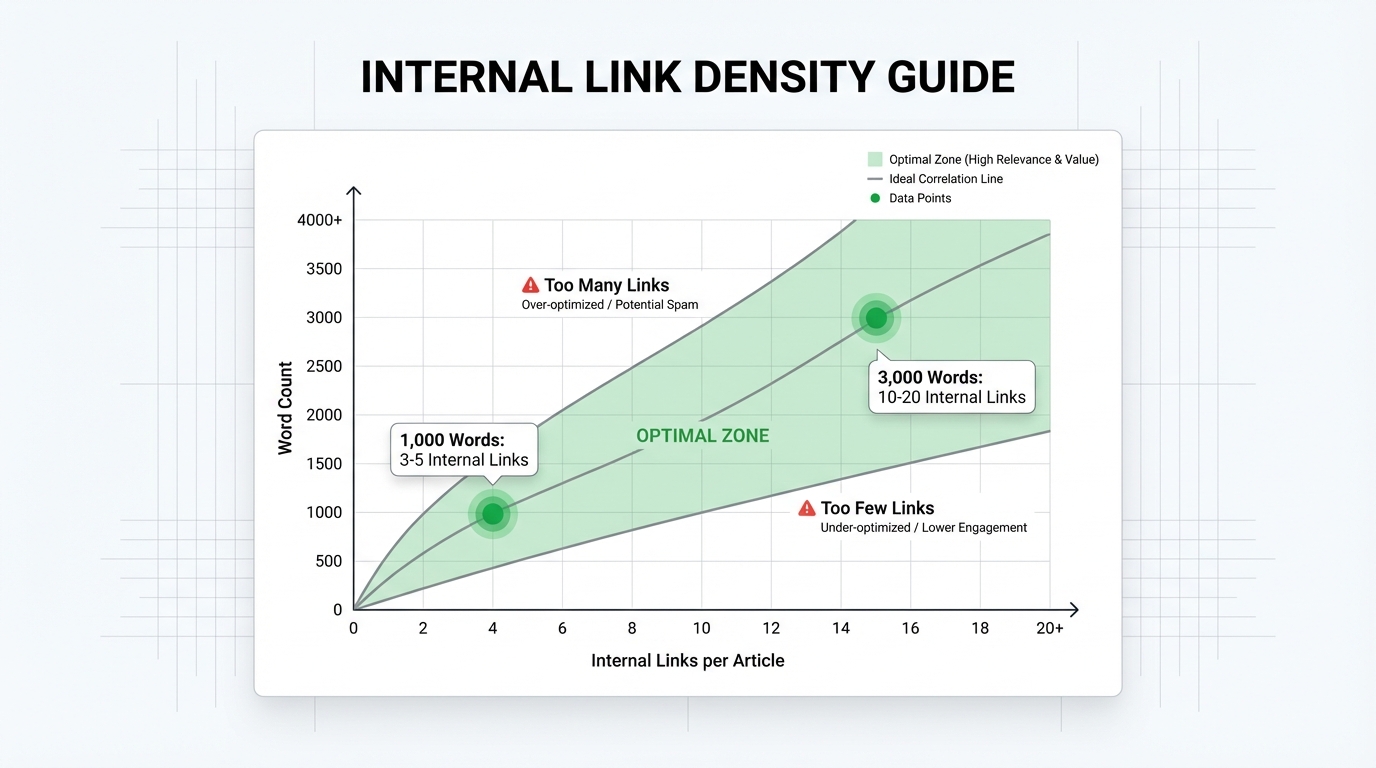
There is no fixed limit for internal links per page, but the most consistently cited guideline is 1 contextual link every 200-300 words, which translates to roughly 3-5 links per 1,000 words for most content.
This sits at the intersection of two competing interests: maximizing crawlability and link equity distribution while keeping pages readable. What most guides skip entirely is the infrastructure cost that link density imposes on large WordPress environments, and why the math behaves differently for manual placement versus automated linking at scale.
How many internal links per page for SEO?
The 200-300 word guideline is not arbitrary. It aligns with what Google's crawlers can process per page while still serving a readable experience for humans. A correlational study of 23 million internal links found that pages with roughly 45-50 total internal links (counting navigation and footer links) tended to perform best, with weaker results beyond that range. This suggests a practical ceiling exists even though Google does not enforce a hard limit in public documentation.
For a 1,500-word article, this translates to roughly 5-7 contextual links. For a 3,000-word pillar page, 10-15 links is a reasonable target. Short pieces under 1,000 words should cap at 3-5 links.
Google's official guidance does not specify a number. The focus is on crawlability and relevance. Per Google Search Central, links must be:
- Valid HTML
<a>tags with proper href attributes - Crawlable URLs pointing to pages on your domain or external sites
- Descriptive in anchor text to signal the destination page's topic
Moz has noted that search engine crawlers tend to process around 150 links per page before potentially stopping, with important pages sometimes handling 200-250 dofollow links. Exceeding that range risks leaving deeper pages undiscovered, though this is a historical guideline rather than a confirmed Googlebot behavior. The practical takeaway: stay well under 150 total links per page unless the page structure genuinely requires more.
Differentiating link types matters more than the raw total. Body links (contextual links within paragraph text) carry significantly more weight than navigational links in headers, footers, and sidebars. A page with 8 body links and 120 navigational links is fundamentally different from a page with 128 links distributed evenly through the content. Focus on contextual placement first; navigational links are infrastructure, not strategy.
The 80/20 rule of internal link equity distribution
When you add an outgoing link from a page, you dilute the authority that page can pass to other destinations. The math is simple but frequently misunderstood.
Consider a page with a domain authority of 40 and 10 outgoing dofollow links. Each link inherits a share of that page's equity. If you increase from 10 to 100 outgoing links, you have not increased the total equity available; you have divided the same pool across ten times as many destinations. Each link now passes roughly one-tenth what it did before.
This explains why link bloat is a real problem. A plugin that automatically adds 200 internal links to every page is not creating value; it is spreading a finite resource so thin that each individual link contributes almost nothing.
In practice, the most impactful links come from contextual placement in high-traffic, high-authority pages. This pattern is observable across top-ranking topic clusters: a small number of well-placed, topically relevant links in the body of authoritative content drives measurably more ranking lift than dozens of low-relevance links scattered throughout a page. The remaining links (navigational components, sidebars, footers) serve crawlability and user orientation, not authority concentration.
For WordPress sites specifically, this distinction matters because many automated linking tools lack this granularity. Tools that inject links indiscriminately create noise. Tools that apply semantic relevance to contextual placement create signal.
How many internal links is too many?
Google's old 100-link guideline no longer applies strictly. The focus has shifted to quality over quantity, and modern guidance points to around 150 total links per page as the point where crawl efficiency starts to degrade, though this is not a hard Google-confirmed threshold.
What actually happens when you exceed the optimal range? Three outcomes appear consistently across large WordPress environments:
- Crawl budget waste: Googlebot spends its per-site crawl budget on low-relevance links instead of discovering new or deeper content.
- Authority dilution: Each outgoing link passes less value, flattening the topical authority structure that search engines use to rank pages.
- User experience damage: Pages dense with links read as spammy, which increases bounce rates and signals low editorial quality.
Research from Scalenut found that page performance weakens meaningfully beyond roughly 50 total links. This is not a cliff edge, and the effect depends on page type. A taxonomy page listing 200 posts is a different case from a blog post with 200 manually inserted links. One is expected structural behavior; the other looks like spam.
A workable rule: if you count all links including navigation, keep the total under 150. If you count only contextual body links, stay under 15 per post for content up to 3,000 words.
The hidden cost of link bloat on WordPress databases
This is the section most SEO guides skip, yet it is critical for agency owners and anyone running a high-volume WordPress site.
Excessive internal linking, particularly when generated at scale by poorly configured automation, creates real database overhead. Every dynamically generated internal link requires the server to resolve the destination URL, often by querying the wp_posts table. At low volumes, this is negligible. At scale, it compounds quickly.
Consider a site with 50,000 posts where a plugin has inserted 100 dynamic links per page. On any given day, a portion of those pages will receive traffic and trigger live page renders. Each render queries the database for every link destination. If those links are generated on page load rather than stored statically, the query load multiplies across concurrent visitors. On traffic spikes, this can saturate MySQL connection pools and cause page timeouts.
The concrete symptoms are measurable:
- Increased Time to First Byte (TTFB): Database overhead delays server response, often visibly in testing tools like WebPageTest or GTmetrix.
- Query queue bottlenecks: MySQL connections saturate under load, causing slow or failed page responses.
- Cache eviction pressure: Object caches like Redis or Memcached fill with link resolution data, pushing out more valuable cached objects.
- Crawler slowdowns: Slower page loads trigger crawler timeouts, reducing how much of your site Googlebot processes within its crawl budget.
The solution is architectural. Tools that compute link placements offline and deploy only finalized decisions via REST API avoid generating this overhead on every page load. The link suggestion and approval happen before any visitor touches the page. Only the stored result hits the database, once, at save time.
By contrast, plugins that generate link suggestions dynamically during page render force every decision through the live database on every request. This is the worst-case scenario for a high-traffic site.
For sites with 10,000 or more pages, running link analysis locally on a desktop app (rather than through a cloud service that uploads your content) adds another layer of control. Local processing keeps content private, removes API latency from the analysis step, and lets editors review suggestions before anything touches the live site.
Incoming vs outgoing internal links: the 40-link benchmark
Most guides focus on how many links a page should contain (outgoing links). Strategic thinking requires also asking how many links a page should receive (incoming links).
This distinction matters because incoming internal links are the mechanism through which you signal topical authority to search engines. Pages that receive many contextually relevant internal links from across your site are, from Google's perspective, important destinations worth ranking. Pages that receive few or none are lower-priority, regardless of their content quality.
Research into internal link distributions consistently shows a strong correlation between the number of incoming internal links a page receives and its search visibility. Pages that receive meaningful internal link equity from across a site tend to rank substantially better than orphaned or under-linked pages, even when content quality is comparable.
For WordPress strategy, this inverts the usual framing. Instead of only asking "how many links should I add to this post", ask: "which pages are my destination hubs, and am I routing enough internal links toward them?"
Pillar pages covering broad topic areas are the primary candidates for concentrated incoming links. A pillar on WordPress SEO might receive links from posts on internal linking, meta descriptions, site structure, anchor text strategy, and dozens of related subtopics. Each link signals relevance; together, they establish topical authority for that hub.
New pages start with zero incoming links. Connecting a new post to 5-10 established hub pages on publication signals contextual relevance to Google immediately, which accelerates indexing. The inverse is also true: a new post that sits unlinked from any existing content may not be crawled at all for weeks.
The 40-link threshold is not a requirement for all pages. It is a target for pages you want to dominate a topic cluster. If you have a page that should rank for a core keyword, engineering 40 or more incoming links from contextually relevant content is one of the most durable SEO improvements available.
Automated internal linking: semantic relevance vs keyword matching
The automation question comes down to this: do you want a tool that matches keywords, or one that understands context?
Exact-match automation finds pages by scanning for keyword overlap. If a post mentions "WordPress SEO", the tool links it to any other page containing "WordPress SEO" in the title or body. The problem is that two pages can share a keyword and serve completely different audiences. A page about SEO for WordPress ecommerce and a page about WordPress SEO for nonprofits both contain the keyword, but linking them serves no one. Users and search engines both detect this artificiality.
Semantic automation understands the contextual meaning of a page, not just its surface keywords. A semantic system evaluates whether the destination page genuinely addresses the reader's next logical question based on the source page's content. If it does not, no link is suggested, even if both pages share a keyword phrase.
The density difference in output is real. Exact-match systems cast a wide net and generate a high volume of suggestions per page, many of which require manual rejection. Semantic systems apply relevance filtering upfront, producing fewer suggestions that are more likely to be genuinely useful. This reduces the editorial overhead of running automated linking at scale, particularly for agency teams managing hundreds of sites.
Google's stance on internal linking quality has consistently emphasized helpfulness and relevance. Pages with dense, low-relevance link clusters tend to underperform compared to pages with sparse, topically cohesive linking. That trend favors semantic approaches over keyword matching regardless of which tool you use.
One additional consideration for agencies: cloud-based linking tools upload your content to external servers for analysis. This introduces both privacy exposure and latency. Tools that process links locally, without sending content off-site, eliminate that exposure entirely and tend to respond faster for bulk operations.
Frequently asked questions
What's the ideal number of internal links for a 2,000-word blog post?
For a 2,000-word post, aim for 6-10 contextual links in the body. This holds to the 1-link-per-200-300-words guideline and excludes navigational links in headers, footers, or sidebars. If the post is part of a topic cluster, several of these links should point to the cluster's pillar page and to closely related subtopic posts.
Can too many internal links hurt SEO?
Yes. Pages that exceed roughly 50 total body links tend to show weaker performance, and the effect is more pronounced when those links lack topical relevance. The threshold is not absolute: a taxonomy or archive page with 50 linked posts is expected behavior. A single blog post with 50 manually placed links is a different matter, and Google's crawlers may deprioritize pages that appear link-heavy relative to their content.
How do I know if my WordPress site has link bloat affecting performance?
Start with your server logs and a tool like Query Monitor (a free WordPress plugin). Look for slow queries involving wp_posts that correlate with pages carrying high link counts. Check TTFB in GTmetrix or WebPageTest for those pages specifically. If link-related queries account for a disproportionate share of your server rendering time, or if TTFB is noticeably higher on link-dense pages versus comparable content, that is a signal to audit link density and consider whether dynamic link generation is contributing to the load.
Should I prioritize incoming or outgoing internal links?
Prioritize incoming links to your most important pages. A page that receives 30-40 internal links from contextually relevant content across your site sends a strong topical authority signal. Outgoing links matter, but only when they are genuinely relevant and few enough per page to preserve the equity each one carries. For key hub pages, aim to receive substantially more links than you emit.
Is semantic linking better than keyword matching for automation?
For SEO quality and editorial efficiency, yes. Semantic systems filter for contextual relevance before surfacing a suggestion, which means fewer irrelevant links get published and less time is spent manually rejecting false positives. Keyword-matching tools produce more suggestions per page, but a larger proportion require rejection or produce links that appear artificial to both readers and search engines. If you are automating internal links at any meaningful scale, the review overhead of keyword matching becomes a real operational cost.
Actionable takeaways
Segment your linking strategy by page type. Pillar pages should accumulate 30-40 incoming links from subtopic content and emit 5-10 contextual outgoing links. Subtopic posts should receive 5-15 incoming links and emit 2-4 contextual outgoing links. Category and archive pages can carry more total links due to their programmatic structure, but those should be listing-based rather than manually placed contextual links.
Audit your current internal link distribution using a crawler that maps incoming and outgoing links per URL. Find orphaned pages (zero incoming links) and connect them from the most relevant pillar pages. Compare traffic performance for well-linked hub pages versus under-linked content; that gap quantifies what better internal linking architecture is worth to your site.
If you deploy automated linking, verify whether the tool generates links at render time or stores them statically. Render-time generation creates recurring database load on every page request. Static deployment, where links are written into content once and served from the database like any other text, does not. For sites above 10,000 pages, this distinction has measurable effects on TTFB and crawl efficiency.
Finally, the 200-300 word density rule is a guideline, not a mandate. Two precisely placed, topically relevant links in a post contribute more than ten links inserted to hit a quota. Quality of placement beats quantity every time, and that is true whether you are linking manually or using an automated system.