How to automate ecommerce internal linking for 10k+ SKU catalogs
Manual ecommerce internal linking stops working at scale. The moment your catalog exceeds 5,000 SKUs and inventory fluctuates daily, the traditional approach of identifying linking opportunities and updating them by hand collapses into pure operational debt.
This guide covers how to automate internal linking infrastructure for massive catalogs using semantic AI instead of keyword matching. You'll learn to handle out-of-stock products without creating dead links, fix keyword cannibalization between similar variants, calculate the revenue impact of orphaned product pages, and deploy links programmatically using local AI models that never upload your catalog data to external servers.
Why manual ecommerce internal linking fails at scale
Manual internal linking for ecommerce breaks under two conditions: volume and velocity. An ecommerce store with 10,000 SKUs and daily inventory turnover faces a real operational impossibility when relying on human decision-making.
Consider the arithmetic. A 10,000-SKU catalog has roughly 50 million unique product pair combinations (10,000 squared, divided by 2). Even if an internal linking strategy targets only the highest-value pairs, identifying relevant links manually requires evaluating thousands of relationships per day as inventory changes. A product goes out of stock; its linking profile becomes invalid. A new product launches; it needs to be linked from complementary items. A supplier updates product attributes; variant hierarchies shift.
Most ecommerce teams handle this by doing nothing. They link best-selling items manually and leave the rest orphaned. Unlinked product pages lose traffic because search engines and users never discover them, which translates directly into missed revenue.
The second failure point is consistency. Manual linking creates islands of well-linked pages (typically top-selling items or category hubs) surrounded by orphan pages. Search engines see a fragmented site architecture. It also signals to Generative Engine Optimization (GEO) systems that certain products are peripheral rather than core to your catalog, reducing their chances of being cited in AI-generated shopping recommendations, according to research from SellSuiteX.
What is semantic internal linking?
Semantic internal linking differs fundamentally from keyword-based internal linking. Keyword-based approaches search for pages that match a target keyword phrase exactly or in close variation. Semantic linking analyzes the contextual meaning and intent of a page's content using vector representations, then suggests internal links to pages with related meaning regardless of shared keywords.
The distinction matters at scale. A product for "men's running shoes with arch support" uses different keywords than "orthopedic sneakers for marathon training." Keyword matching treats these as separate concepts. Semantic analysis recognizes they address the same user need and links them together.
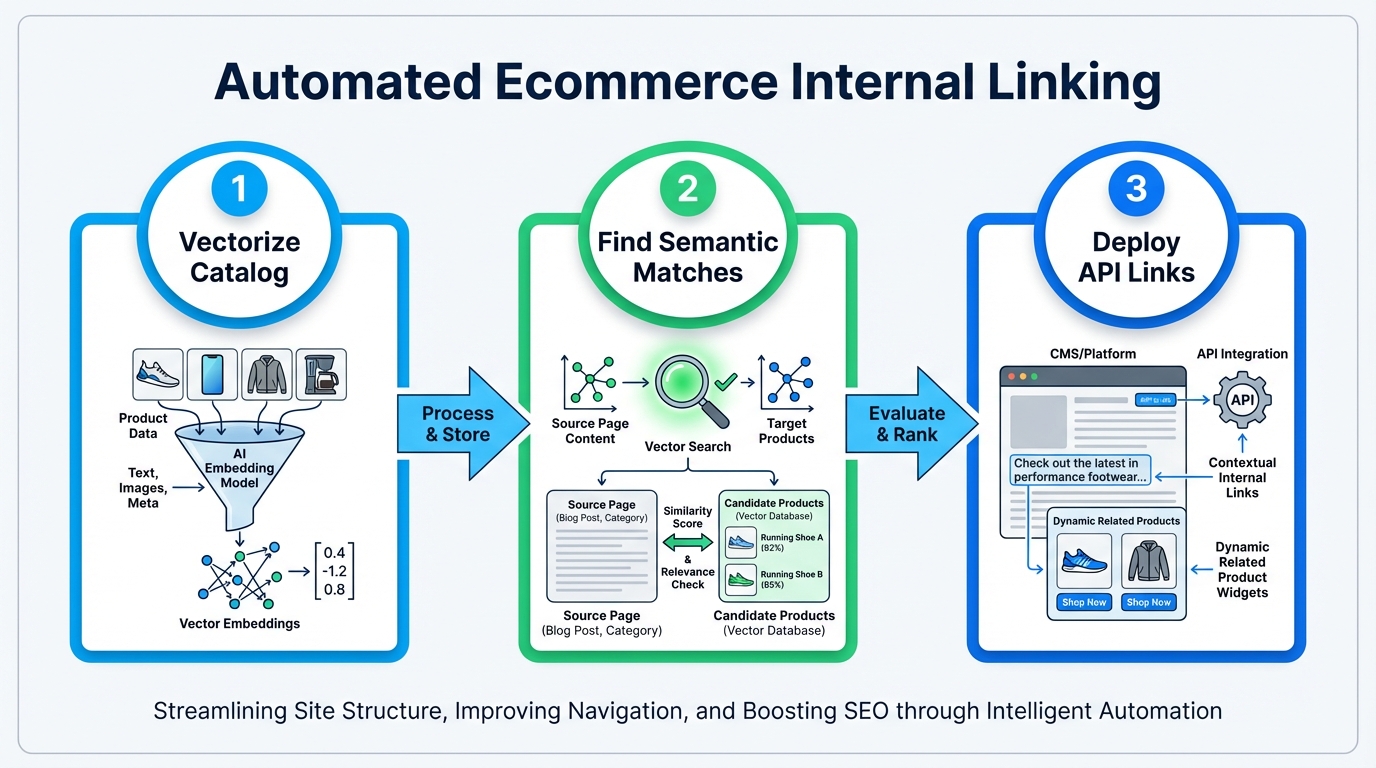
How it works: each product page is processed through a vector embedding model, converting the page's title, description, attributes, and category into a multi-dimensional numerical representation. This vector captures meaning. A second vector is created for candidate link targets. The system calculates the distance between vectors. Pages with shorter distances (higher semantic similarity) are suggested as internal link candidates.
This approach handles product variations automatically. A catalog with 500 color and size variations of the same shoe is processed as a single semantic concept with multiple instances, not 500 unrelated products competing for links. The system establishes hierarchical linking automatically: linking variants to the parent SKU and the parent to category pages, as outlined in this diagnostic checklist from Cartiful.
How to handle internal links for out-of-stock products
Out-of-stock product pages create a specific technical problem. They cannot be deleted because they hold inbound links and traffic history. Removing them causes 404 errors and link equity loss. But linking to an out-of-stock page frustrates users and wastes internal link value.
The programmatic solution involves five steps.
First, categorize out-of-stock states. Distinguish between temporarily out of stock (product will be restocked, traffic should be preserved) and permanently discontinued (product will never return). Apply different link handling to each.
For temporarily out-of-stock products, return HTTP 200 so the page remains indexed. Update the product page markup to include structured data indicating availability status. This tells search engines the product exists but is temporarily unavailable, preserving its ranking history.
Second, redirect related links instead of removing them. Instead of linking directly to out-of-stock products, insert a server-side redirect rule that points to the next-best alternative: either a similar in-stock product or the parent category page. If a user clicks an internal link intended for an out-of-stock blue running shoe, a 307 Temporary Redirect (not a 301 Permanent) routes them to the in-stock red version of the same shoe. The 307 preserves the temporary nature of the out-of-stock state. When inventory is replenished, remove the redirect and restore direct linking.
Third, use your internal linking tool's REST API to identify all internal links pointing to out-of-stock products and apply the redirect rule programmatically. Manual edits in a CMS do not scale across thousands of SKUs.
Fourth, monitor restock events. Set up a webhook or cron job that watches inventory data. When a product transitions from out-of-stock to in-stock, automatically remove the redirect and restore direct internal links.
Fifth, if a product is permanently discontinued, migrate internal links to semantically similar in-stock products rather than category pages. This preserves link equity and keeps users browsing the product catalog instead of landing on a filtered listing.
This workflow prevents the broken-link problem that occurs during inventory fluctuations. Most internal linking guides acknowledge broken links as an issue; almost none provide the specific HTTP status and redirect protocol that makes the fix reversible.
Fixing keyword cannibalization between similar SKUs
Keyword cannibalization in ecommerce catalogs occurs when multiple product pages target the same search intent. A store selling both "leather messenger bags" and "leather crossbody bags" risks both pages ranking for the same queries if their link architecture does not explicitly differentiate them.
Search engines depend on internal linking to establish topical hierarchy. If pages with equal internal link profiles both target similar keywords, the search engine cannot determine which is the primary product. It may index both but rank neither as strongly as a consolidated page would rank, as explained by LaTeva Web.
Solve this using hierarchical internal linking that establishes a canonical product relationship.
Start by defining variant hierarchies. Group products by semantic category: all shirt variations (color, size, material) belong to one parent product, all bag styles to another.
Next, link from parent to child. The parent product page (e.g., "leather messenger bag") accumulates internal links from category pages, blog content, and related product recommendations. Child pages (specific color or size variants) are linked from the parent only, not independently from other pages.
Use rel="canonical" tags on variants. Point variant pages to their parent so search engines treat variants as attributes of a single product rather than separate indexable pages competing for rankings.
Bias anchor text toward the parent. Internal links from other pages to variant groups should use anchor text pointing to the parent product (e.g., "leather messenger bags" rather than "brown leather messenger bag in small size"). This concentrates ranking power on the primary product page.
The result is clearer topical authority. Search engines understand that one product is primary and its variants are editions, not competing products. This prevents ranking loss from cannibalization and improves click-through rates because users see the definitive product page in search results rather than a less-complete variant page.
Calculating the revenue impact of orphan page recovery
Most ecommerce guides mention that orphan pages (pages with no internal links) harm rankings. They rarely quantify the revenue impact in a way that justifies engineering investment.
Use this formula to estimate recovered revenue from orphaned product pages:
Recovered Revenue = (Orphaned Pages x Average Traffic to Orphaned Page per Month) x Average Order Value x Conversion Lift Factor
Break this down:
-
Identify orphaned pages using a crawler like Screaming Frog SEO Spider. Filter for product pages only, excluding category, informational, and checkout pages.
-
Pull traffic data from Google Analytics for each orphaned page over the past 90 days. Calculate average monthly traffic. Many orphaned pages receive zero traffic; exclude those. Focus on pages with at least 5 visits per month, which indicates some discoverability from search or external links.
-
Determine your average order value (AOV) from your analytics or accounting system: total revenue divided by total orders.
-
Apply a conversion lift factor. Based on observed patterns across ecommerce sites, strategic product recommendations and internal linking lift AOV by roughly 15 to 25 percent on linked pages. Use 20 percent as a conservative midpoint for projection purposes. This is not a cited benchmark; it is a reasonable planning assumption based on how contextual links reduce exit rate and surface related inventory, as detailed in this structural approach from Incremys.
-
Multiply orphaned traffic by AOV by 0.20. This estimates the revenue lift from linking those pages and making them discoverable to users already on your site.
Example: a store has 150 orphaned product pages receiving an average of 12 visits per month each (1,800 visits total). The AOV is $180. Recovered revenue = 1,800 x $180 x 0.20 = $64,800 in annual incremental revenue from linking those pages alone.
At $64,800 in recovered annual revenue, 5 hours of implementation work yields a return that is difficult to justify skipping. That arithmetic is what drives the case for automation, not the technology itself.
Automating link infrastructure with local AI models
Some SEO plugins generate link suggestions by sending your content to external servers for processing. This exposes catalog data to third parties, introduces latency, and limits how deeply you can customize the relevance logic.
Local AI automation processes all link suggestions on your own infrastructure using a vector database and REST API.
The architecture works like this: a desktop application runs on your machine with a local vector database. Your WordPress site connects via REST API using application passwords. When the automation runs, the app queries WordPress to fetch product pages, converts page content to semantic vectors locally, and calculates similarity scores between all pages. No catalog data leaves your machine.
The app returns a list of recommended internal links ranked by semantic relevance. You review suggestions and choose auto-approve (deploy immediately) or manual approval (review first, then deploy).
Links deploy back to WordPress through the REST API, writing to post content or a custom postmeta field rendered by your plugin.
For the vector database layer, well-established open-source options include FAISS (Facebook AI Similarity Search), Chroma, and SQLite-based embedding stores. Each handles similarity calculations locally without cloud dependency.
For a 10,000-SKU catalog, the vectorization step is computationally straightforward on modern hardware. The bottleneck is typically the REST API calls to fetch page content, not the vector calculations themselves.
Key practical advantages of local processing:
- No catalog data leaves your infrastructure.
- Bulk operations handle large catalogs without cloud rate limits or timeouts.
- You can define relevance thresholds, exclude specific product categories, or weight links by business rules (e.g., always surface related service pages above product cross-sells).
- One-time tooling cost instead of per-SKU monthly fees charged by SaaS platforms.
Implementation steps:
- Generate WordPress application passwords under Settings > Security.
- Connect your site URL and application password to your local automation tool.
- Set a minimum semantic relevance threshold (0.75 on a 0-to-1 scale is a reasonable starting point).
- Run the vectorization process to convert product pages into semantic space.
- Review suggested links in the app's interface, grouped by page.
- Set links to auto-approve or approve manually before deployment.
- Deploy links via REST API.
- Schedule weekly recurring automation to handle new products and inventory changes.
WPLink is a desktop application (macOS and Windows) built for this workflow specifically in WordPress and WooCommerce environments. It uses local processing with no cloud uploads, supports BYOK (Bring Your Own Key) for OpenAI, Anthropic, or open-source models like Llama, and deploys links via the WordPress REST API with review and auto-approve options.
This workflow eliminates the manual bottleneck. Instead of identifying thousands of linking opportunities by hand, you validate suggestions in batches, which compresses the time-to-live from months to weeks.
Comparison: manual placement versus automated deployment
| Phase | Manual process | Automated REST API |
|---|---|---|
| Identify linking opportunities | 100+ hours (10k SKUs) | Minutes |
| Evaluate relevance | Manual review | Automated scoring with threshold filtering |
| Create links | Copy-paste or CMS UI | Bulk REST API write |
| Handle out-of-stock changes | Manual audit monthly | Automatic 307 redirect deployed same day |
| Cannibalization review | Spot-check high-traffic pages | Hierarchical linking auto-established by parent-child structure |
| Total time to live (first pass) | 3 to 6 months | 1 to 2 weeks |
| Monthly maintenance | 20+ hours | 2 to 4 hours |
For a store generating $500,000 per month with a team of two, manual linking represents a 3-to-6-month opportunity cost before any links are live. Automation compresses that to 2 weeks and reduces ongoing maintenance by roughly 80 percent.
Implementing semantic internal linking at scale
Start with a pilot focused on your highest-revenue product categories. Link the top 500 SKUs first to validate the semantic relevance logic and measure ranking impact before expanding to the full catalog.
- Select your top revenue-driving category (shoes, electronics, home goods, or whichever drives most revenue).
- Run semantic linking on products in that category only.
- Deploy links and monitor rankings for 4 weeks.
- Measure clicks and conversion lift on those product pages compared to control categories.
- If lift is positive, expand to all categories and set up weekly recurring automation.
Once running weekly, automation handles new inventory, discontinued products, and link updates continuously. Your internal link infrastructure stops being a project and becomes operational infrastructure.
Frequently asked questions
How do I prevent semantic linking from creating irrelevant links?
Set a relevance threshold (0.75 on a 0-to-1 similarity scale is a common starting point) below which suggestions are not shown. Manually review the first 100 suggested links before enabling auto-approval. Refine your threshold based on how many irrelevant results appear in that initial batch.
Can I use semantic linking alongside Yoast or RankMath?
Yes. Semantic linking tools that operate via REST API read post content and write internal links to post_content or postmeta without touching Yoast or RankMath metadata fields. Confirm compatibility with your specific tool before deploying at scale.
Should I link every product to every similar product?
No. Limit contextual links to 2 to 4 per product page. Too many links dilute focus and hurt user experience. Use your highest-relevance suggestions first. Breadcrumb and category navigation handle broader linking; reserve contextual links for genuinely related products.
How often should I rerun semantic linking automation?
Weekly for sites with high inventory churn. Monthly for stable catalogs. Set up a cron job or scheduled task to re-vectorize new products and update links automatically.
What happens to link equity when a product goes out of stock?
307 Temporary Redirects preserve link equity and transfer it to the in-stock alternative. When the product is restocked, remove the redirect and link equity flows back to the original page.
Can I use local AI models instead of cloud APIs?
Yes. Desktop tools with bundled local vector databases let you choose between commercial APIs (OpenAI, Anthropic) or open-source models (Llama, Mistral) for semantic vectorization. This removes dependency on external platforms entirely and keeps catalog data on your own machine.
Related Reading
- How to Add Internal Links to Product Pages (2026 Guide): Step-by-step guide for deploying internal links programmatically in WooCommerce.
- Internal Linking Strategy Guide: Framework for prioritizing link targets by business value and semantic relevance.
- Does Internal Linking Help SEO?: Data-driven analysis of how internal linking impacts rankings and user engagement metrics.
- What Is Internal Linking?: Primer on the fundamentals of internal linking for SEO and site architecture.